
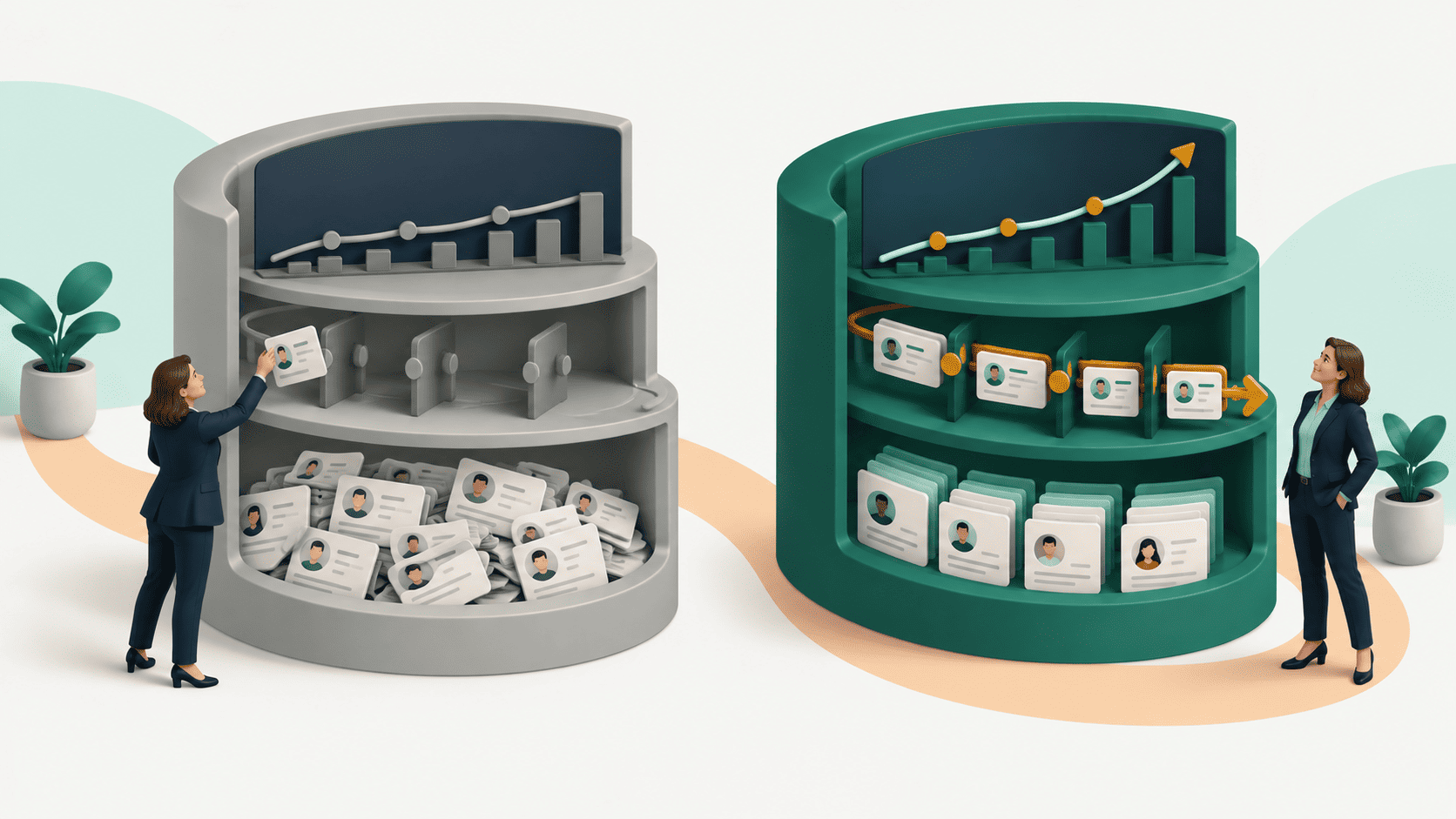
A comparison of AI CRM vs traditional CRM often focuses on features: automation, predictive analytics, generative AI, lead scoring, and chat assistants. Those differences matter. But they miss the more fundamental change.
The biggest difference between an AI CRM and a traditional CRM is who maintains and interprets the customer record.
A traditional CRM primarily depends on people to enter, update, and organise data. An AI CRM can reduce that manual burden by capturing information from work, enriching records, identifying changes, and helping teams interpret what matters.
But there is another distinction buyers should understand in 2026. Not every CRM with an AI assistant is an AI-native CRM. Some platforms add AI capabilities to an existing system of record. Others are designed to use AI to help maintain the record itself.
That changes the question buyers should ask. The question is no longer simply, "Does this CRM have AI?" It's, "How much work does my team still have to do to keep this CRM useful?"
TL;DR
- The biggest difference is who maintains the record: people or the system itself.
- Not all AI CRMs are AI-native: many add AI features to a conventional database.
- Stale data limits intelligence: AI insights are only as useful as the context behind them.
- Traditional CRM still has a place: simpler, stable processes may not need autonomous maintenance.
AI CRM vs Traditional CRM: The Quick Answer
| Capability | Traditional CRM | AI-enabled CRM | AI-native CRM |
|---|---|---|---|
| Primary role | Store and organise records | Add AI capabilities to existing workflows | Maintain and interpret the record |
| Data entry | Primarily manual | Partially automated | Captured from work wherever possible |
| Record updates | Rep or admin driven | AI-assisted | Designed for continuous maintenance |
| Data freshness | Depends heavily on user discipline | Improved through automation | Can include enrichment and change detection |
| Insights | Users query reports and dashboards | AI summaries and recommendations | Context can be surfaced proactively |
| Pipeline stages | Typically manually updated | AI can assist | Can transition based on evidence |
| AI's role | Limited or rules-based | Feature layer | Part of the system architecture |
| Best fit | Stable, controlled processes | Teams extending an existing CRM | Teams constrained by manual CRM maintenance |
The difference is important because the CRM has always had two jobs:
- Create a reliable record of customer relationships.
- Help people make better decisions using that record.
Traditional CRM focused primarily on the first. Modern AI capabilities improve the second. AI-native CRM attempts to change both.
What Is a Traditional CRM?
A traditional CRM is a central system for storing and organising customer information.
It typically contains:
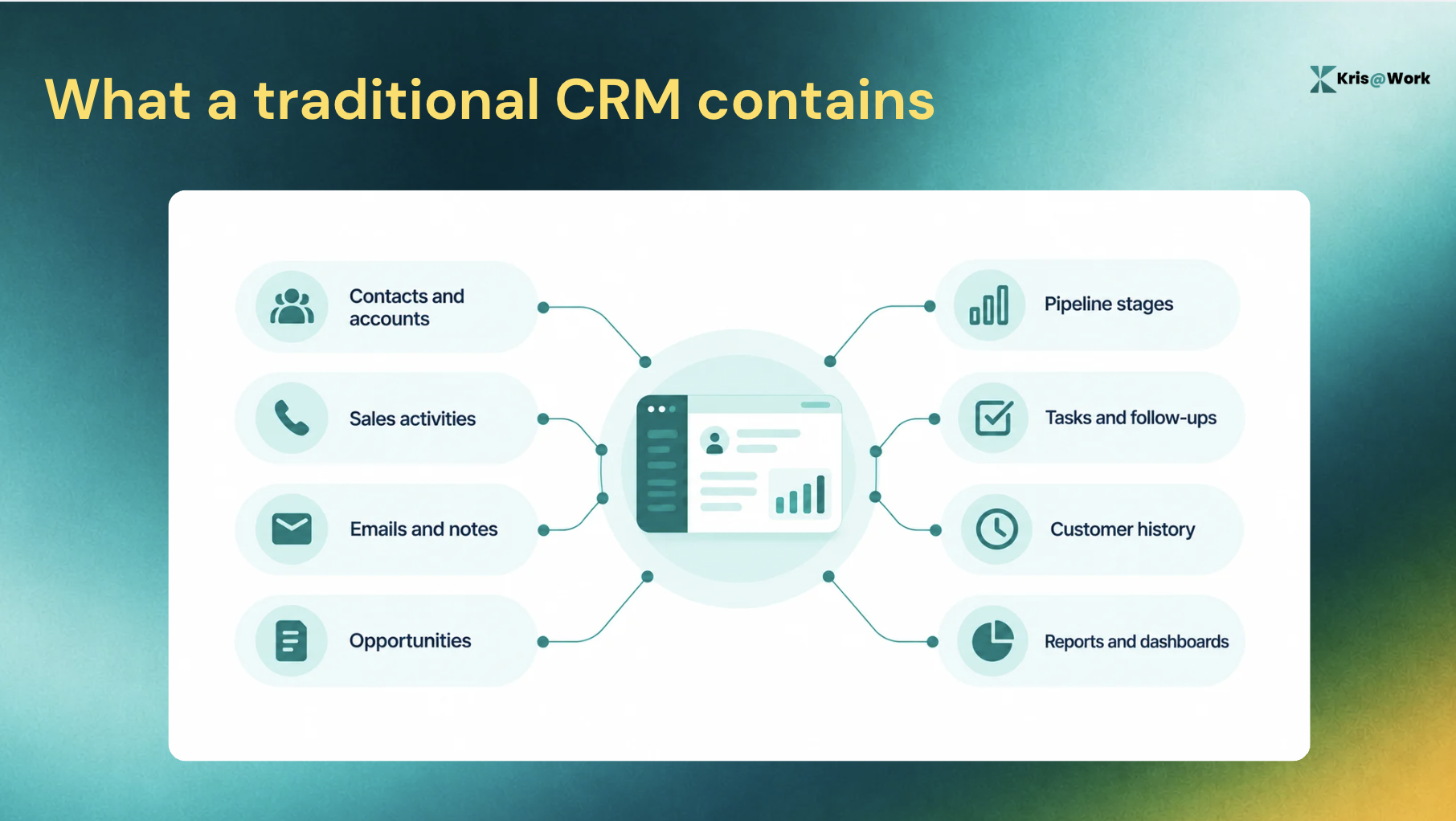
Platforms such as Salesforce, HubSpot, Microsoft Dynamics 365, and Pipedrive helped establish the CRM as the central system of record for sales and customer teams. That model solved a major problem: customer information no longer had to live exclusively in individual inboxes, spreadsheets, or the memories of individual reps.
Traditional CRMs are still good at:
- Creating structured customer records
- Standardising sales processes
- Managing permissions and governance
- Supporting repeatable workflows
- Reporting on known information
- Giving teams a shared database
- Maintaining control over complex processes
The problem is not that traditional CRM is inherently bad at storing information. The problem is how much human effort is often required to keep that information current.
Consider a typical sales interaction. A rep has a discovery call. New information emerges about the buyer's priorities, timeline, stakeholders, budget, and objections.
After the call, the rep may need to:
- Write call notes.
- Update contact information.
- Change opportunity fields.
- Move the deal to a new stage.
- Create follow-up tasks.
- Notify another stakeholder.
- Update the forecast.
The CRM only reflects reality after someone does that work. A traditional CRM is usually only as current as the last person who updated it. That is the limitation AI CRM is trying to address.
What Is an AI CRM?
An AI CRM uses artificial intelligence to reduce manual work and help teams understand customer information. Depending on the platform, AI CRM capabilities can include:
- Automatic activity capture
- Data enrichment
- Change detection
- Conversation summaries
- Lead scoring
- Deal health analysis
- Predictive recommendations
- Natural-language queries
- Next-best-action guidance
- Generative content assistance
- Workflow automation
This sounds straightforward, but the term AI CRM has become broad enough to describe very different products. A CRM with an AI writing assistant and a CRM designed to autonomously maintain customer records may both call themselves AI-powered. They are not necessarily the same thing.
Not All AI CRMs Are AI-Native
The most useful way to understand the difference between AI CRM and regular CRM is to think about three categories.
Traditional CRM
The core system is a database. People and workflows maintain the data. Intelligence is generally produced through reports, dashboards, rules, and human analysis.
AI-enabled CRM
The underlying CRM architecture remains largely the same, but AI capabilities are added to it. These capabilities might include:
- AI assistants
- Generative writing
- Conversation summaries
- Predictions
- Scoring
- Recommendations
The AI helps users work with the CRM more effectively.
AI-native CRM
An AI-native CRM takes a different approach.
Instead of assuming people will maintain the record and AI will help analyse it later, the system is designed to use AI throughout the lifecycle of the record. That can include capturing evidence, structuring information, detecting changes, maintaining records, and helping users understand what requires attention.
Adding an AI assistant to a database changes what users can do with the CRM. Making AI responsible for helping maintain the record changes how the CRM works.
This is the difference many AI CRM comparisons overlook.
The Difference Between AI CRM and Traditional CRM Comes Down to Four Jobs
A CRM does more than store contacts and opportunities. At a fundamental level, it has four jobs:
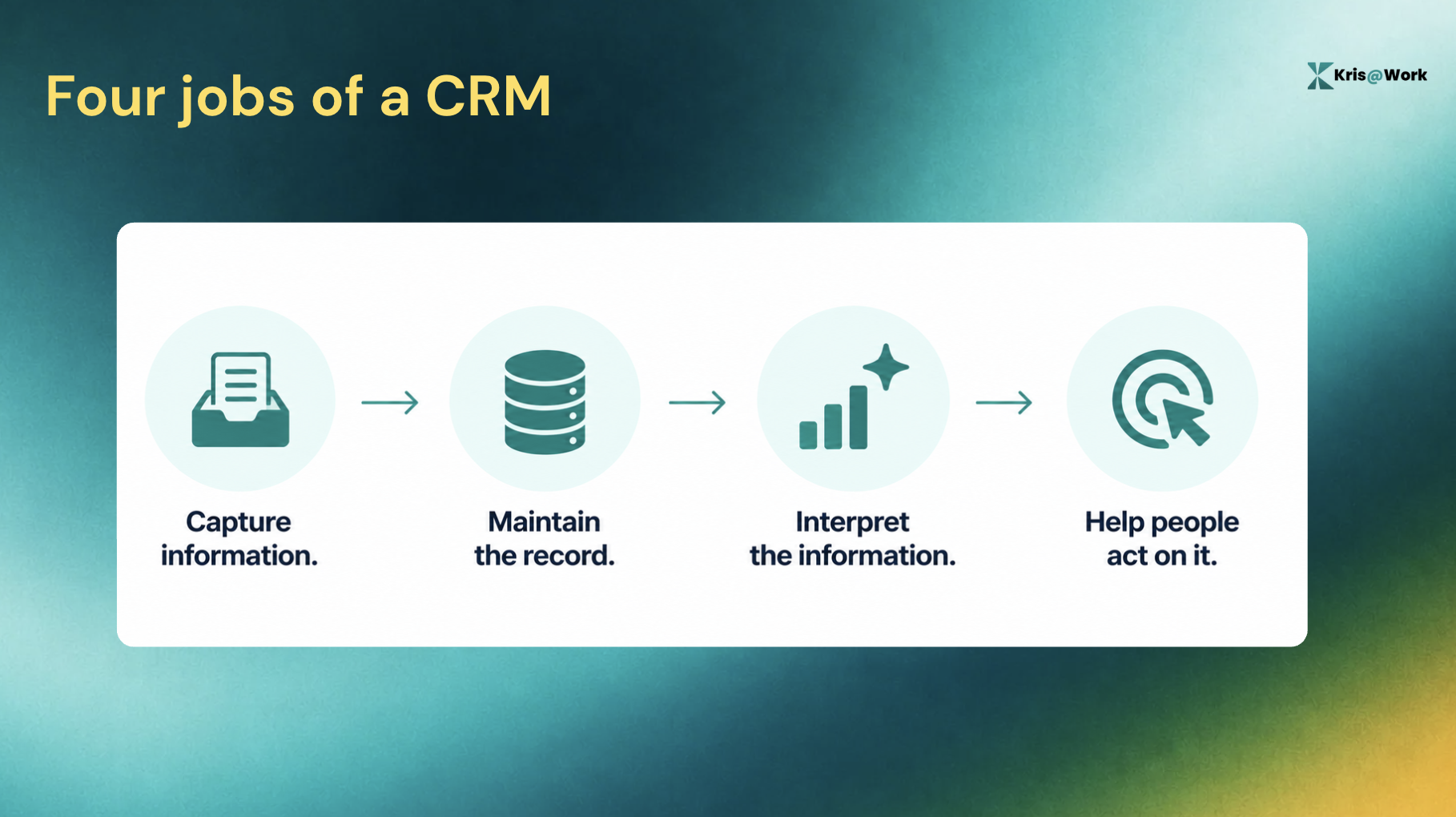
The difference between traditional and AI-driven approaches becomes clearer when you compare them through those four jobs.
1. Capture: How Does Information Enter the CRM?
Traditional CRMs generally rely on people to enter information. That might happen through:
- Manual notes
- Form submissions
- Email logging
- Call summaries
- Imports
- Integrations
- Workflow rules
Some of this can be automated. But the underlying model often still depends on a person or process deliberately pushing information into the system.
An AI CRM can use connected customer activity as a source of structured context.
Instead of asking:
"What should I enter into the CRM after this interaction?"
The system can ask:
"What happened, and what information should become part of the record?"
Because every manual step creates the possibility that information will not be recorded. The problem is not necessarily that salespeople dislike CRM. It's that CRM administration competes with the work they were hired to do.
2. Maintain: Who Keeps the Record Accurate?
This may be the biggest difference between AI CRM and traditional CRM. Customer data does not remain accurate simply because it was accurate when it was entered.
People change jobs, companies hire new executives, accounts grow, opportunities gain or lose stakeholders, priorities change, etc.. A CRM is not a one-time database project. It is a continuously changing representation of customer reality.
Traditional CRM maintenance:
In a conventional model, data quality depends on a combination of:
- Rep discipline
- Sales operations processes
- Periodic data cleanup
- Third-party enrichment
- Manager oversight
- Automated workflows
This can work well, but it creates a structural dependency: someone has to notice and maintain the change.
AI CRM maintenance:
AI-driven systems can reduce that dependency through capabilities such as:
- Automated enrichment
- Change detection
- Activity capture
- Record updates
- Duplicate detection
- Data validation
The goal is to reduce the amount of routine maintenance required to keep the system useful.
The CRM maintenance problem is not a one-time migration problem. It is a continuous operations problem. A database does not stay accurate because it was clean on implementation day. It stays accurate because something continuously maintains it. That is where AI-native CRM architecture becomes particularly relevant.
3. Interpret: Can the CRM Explain What the Data Means?
Traditional CRMs are good at answering questions when users know what to ask.
A sales manager might open a dashboard to investigate:
- Pipeline coverage
- Stage conversion
- Deal velocity
- Rep activity
- Forecast changes
The workflow is generally reactive:
- Something needs to be understood.
- A person opens a report.
- The person interprets the information.
- The person decides what action to take.
AI changes this interaction.
AI CRM can help interpret context:
Depending on the system, AI can:
- Summarise account history
- Identify patterns
- Analyse deal health
- Detect anomalies
- Highlight risks
- Compare changes over time
- Answer questions in natural language
But there is an important limitation. AI-generated insight is only as useful as the context behind it. A sophisticated AI layer analysing stale or incomplete CRM data still has a stale or incomplete foundation.
This is why capture and maintenance matter before intelligence.
The four jobs build on one another:
Capture > Maintain > Interpret > Act
If the record is incomplete, interpretation becomes less reliable. If interpretation is delayed, action becomes reactive.
4. Act or Guide: What Happens After an Insight Appears?
Traditional CRM systems record what happened. People then decide what should happen next. That process may be supported by:
- Tasks
- Reminders
- Workflow rules
- Playbooks
- Manager coaching
AI CRM can extend this model by helping identify what deserves attention. For example, an AI system might help a rep understand:
- Which deal has changed
- Why a deal may be at risk
- Which account requires attention
- What information is missing
- Which stakeholder should be involved
There are different levels of intelligence here.
1. Automation
A system executes predefined instructions. For example, if a deal reaches Stage 3, create a task.
2. AI assistance
A system generates or recommends something in response to a request. For example, summarise the last five customer interactions.
3. Proactive intelligence
A system identifies something relevant before a user explicitly asks. For example, this account has changed in a way that may affect the opportunity.
These capabilities should not be treated as interchangeable. A workflow can automate a task without understanding context. An AI assistant can answer a question without proactively identifying a risk. And an AI-native system can attempt to combine current evidence with guidance about what matters next.
AI CRM vs Traditional CRM: Side-by-Side Comparison
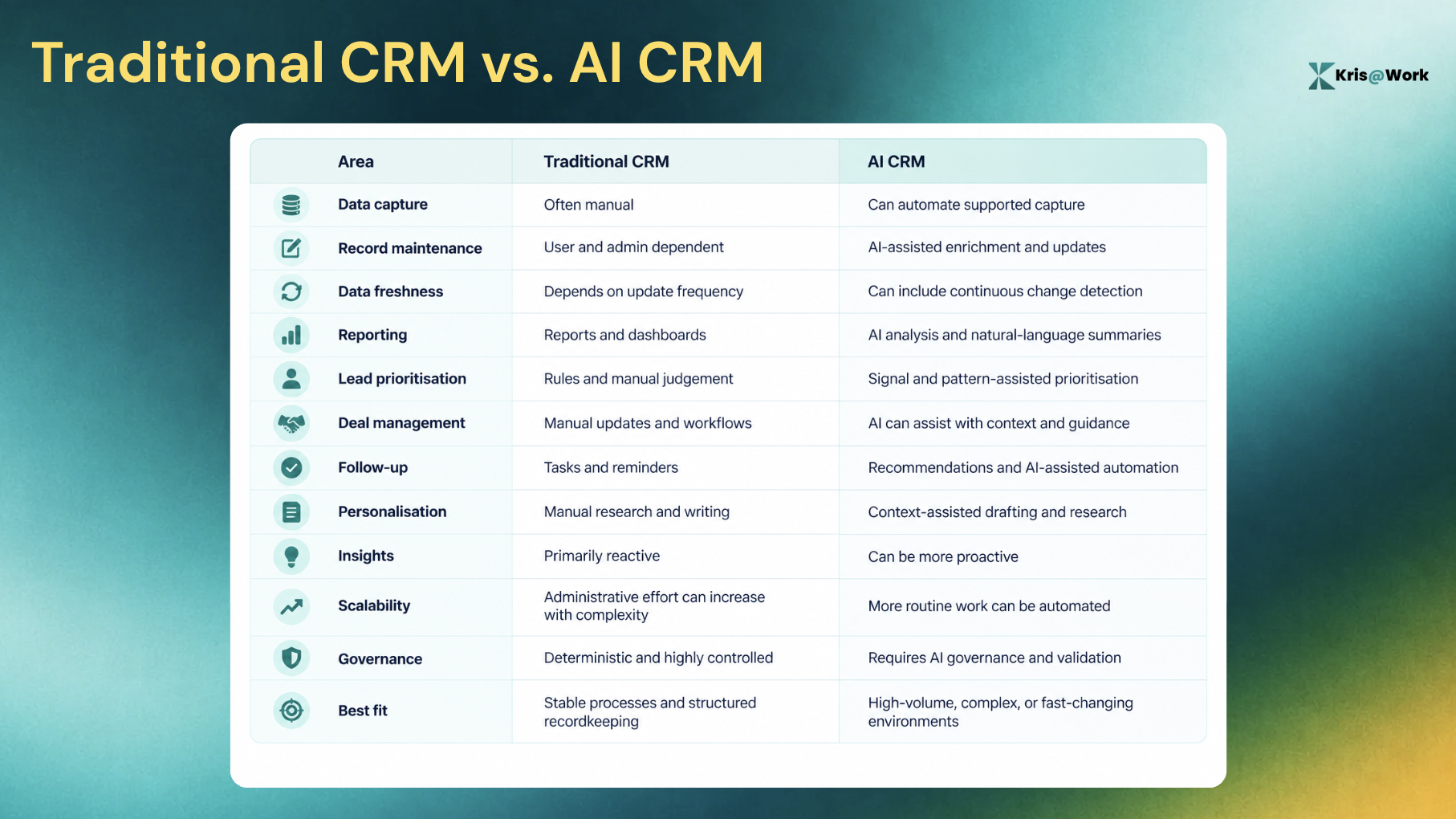
The comparison does not mean every AI CRM will outperform every traditional CRM in every category. Implementation quality, data access, and governance matter as well. And not every organisation needs the same level of intelligence.
When Does an AI CRM Become Worth It?
The right time to consider AI CRM is not if/when a company reaches a specific employee count. It is when certain operational problems begin to appear.
1. Reps spend too much time maintaining records
If CRM updates consistently happen after hours, at the end of the week, or immediately before forecast reviews, the problem may not be rep discipline. The workflow may simply be asking people to perform too much administrative reconstruction.
2. Your CRM data becomes stale quickly
Warning signs include:
- Contacts with outdated titles
- Opportunities that have not been updated
- Missing stakeholders
- Inaccurate pipeline stages
- Incomplete interaction history
If the organisation regularly runs CRM cleanup projects, it may be worth asking why the system requires periodic recovery.
3. Managers do not trust the pipeline
A CRM can contain thousands of records and still fail to provide a trustworthy view of reality. When managers constantly ask reps:
"Is this deal actually current?"
the system of record is not fully functioning as a system of record.
4. Reps struggle to prioritise
As teams handle more accounts, signals, interactions, and opportunities, prioritisation becomes harder. The problem is not always a lack of information. It can be too much information without enough interpretation.
5. Important context is scattered across tools
Customer context may live across:
- CRM records
- Call recordings
- Internal chat
- Documents
- Prospecting platforms
The more systems involved, the more work required to reconstruct the full account story.
6. CRM adoption requires constant policing
When managers have to remind reps to repeatedly:
- Update stages
- Log activities
- Complete fields
- Add notes
the CRM has become another job to manage. That is often the point where a buyer should investigate whether the system itself can assume more of the maintenance burden.
AI CRM vs Regular CRM: What Actually Changes in a Rep's Day?
Feature comparisons can make the difference sound abstract.The workflow difference is easier to understand.
A traditional CRM workflow
Before a customer call, the rep may need to:
- Search for account information
- Read previous notes
- Review emails
- Check other systems
- Reconstruct recent history
During the call, the rep gathers new information. After the call, the rep may need to:
- Write notes
- Update the opportunity
- Change fields
- Create tasks
- Notify stakeholders
- Schedule follow-ups
Later, the rep or manager reviews reports to determine which opportunities need attention. The system records reality after the human has translated reality into CRM fields.
An AI CRM workflow
An AI-driven system can potentially help:
- Capture interaction context
- Structure relevant information
- Enrich records
- Detect changes
- Maintain supported fields
- Surface relevant context
- Highlight what requires attention
The rep still makes decisions, owns the relationship, and applies judgement.
But the amount of administrative work required between something happening and the system reflecting it can decrease. The difference is that humans spend less time reconstructing reality before they can make one.
The Hidden Cost of Traditional CRM Is Not Just the Subscription
When companies compare CRM pricing, they often compare:
- Per-user licences
- Implementation costs
- Add-ons
- Integration fees
Those are important. But the operational cost of the CRM model can be larger than the software subscription.
1. Rep time
Every manual update has a time cost. Individually, logging a call or updating a field may take seconds or minutes. Across hundreds of interactions and dozens of reps, those tasks accumulate.
2. Data decay
Incomplete records create downstream problems. Poor data can affect:
The cost is not simply that a field is blank. The cost is that someone decides without the full context.
3. Management overhead
Traditional CRM models can require managers and operations teams to enforce data quality. That can mean:
- CRM audits
- Pipeline review preparation
- Field completion policies
- Data cleanup projects
- Adoption reporting
4. Tool fragmentation
As organisations outgrow the capabilities of their core CRM, they may add specialised tools around it. For example:
- Data enrichment
- Conversation intelligence
- Sales engagement
- Revenue intelligence
- Prospect research
Specialised tools can be valuable. Fragmentation is not automatically bad. But each additional system can introduce another integration, workflow, and source of context that must be reconciled.
The real cost will be:
Administrative effort + data maintenance + management overhead + fragmented context
AI-Enabled vs AI-Native CRM: The Questions Buyers Should Ask in 2026
"AI-powered" has become a broad marketing category. Buyers should look beyond the label. Here are five questions that reveal how deeply AI is integrated into a CRM's operating model:
1. Does AI help create the record, or only analyse it?
A system that generates insights is useful. A system that also helps maintain the information behind those insights solves a different problem.
2. Can the system keep information current without manual cleanup?
Ask specifically about:
- Contact changes
- Firmographic updates
- Activity capture
- Opportunity progression
- Record enrichment
Automation at data entry is different from continuous maintenance.
3. Are AI insights grounded in evidence?
AI-generated recommendations should not become unexplained black boxes. Buyers should ask:
- Where did this insight come from?
- What evidence supports it?
- Can a user verify it?
Explainability matters more as AI becomes more involved in revenue decisions.
4. Does the AI only respond when asked?
There is a difference between "Ask the AI a question" and "The system noticed something that may require attention."
The first is AI assistance. The second moves closer to proactive intelligence. Both can be useful, but they solve different problems.
5. If the AI features disappeared, would the underlying CRM workflow fundamentally change?
This may be the most revealing question. If removing AI leaves the operating model essentially unchanged, the platform may be an AI-enabled CRM.
That is not inherently a weakness. But buyers looking for a fundamental reduction in CRM maintenance should understand the distinction. If removing the AI leaves the operating model unchanged, you may have an AI-enabled CRM rather than an AI-native one.
Where Kris Fits Into the AI CRM Shift
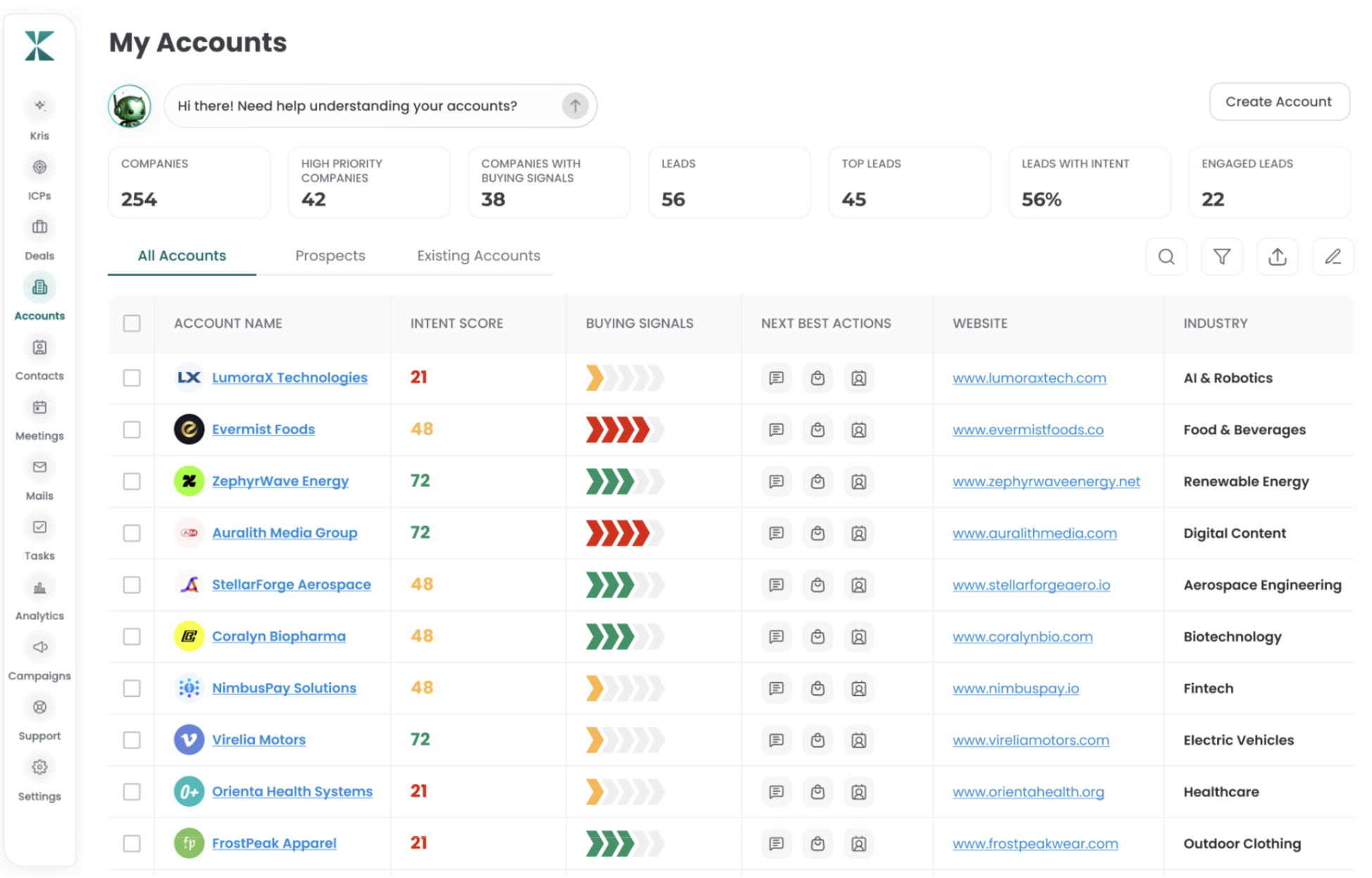
Kris AI CRM takes an AI-native approach to the system of record, but adopting it does not mean you have to abandon the CRM you already use. The bigger shift is in how the record is maintained and kept useful. Traditional CRM data can become stale between manual updates. A contact changes jobs, a new stakeholder joins an account, or a deal progresses, but the CRM may continue showing the old state until someone updates it.
Kris is designed to automatically refresh information based on the status and context of a deal, while also keeping person-level details current. For example, if a key contact leaves the company, Kris can surface that change so your team knows before acting on outdated information. Kris AI CRM supports self-enrichment of titles, firmographics, and contacts, along with change detection.
Your team should not have to make decisions using stale CRM data.
Work with the CRM you already have
Adopting an AI-native CRM does not necessarily mean replacing your existing CRM. Kris supports bi-directional sync, allowing information to move between Kris and your existing CRM.
- Existing CRM → Kris: Your existing CRM data can flow into Kris, giving it the customer and deal context it needs.
- Kris → Existing CRM: Updates made through Kris can flow back into your existing CRM, keeping both systems aligned.
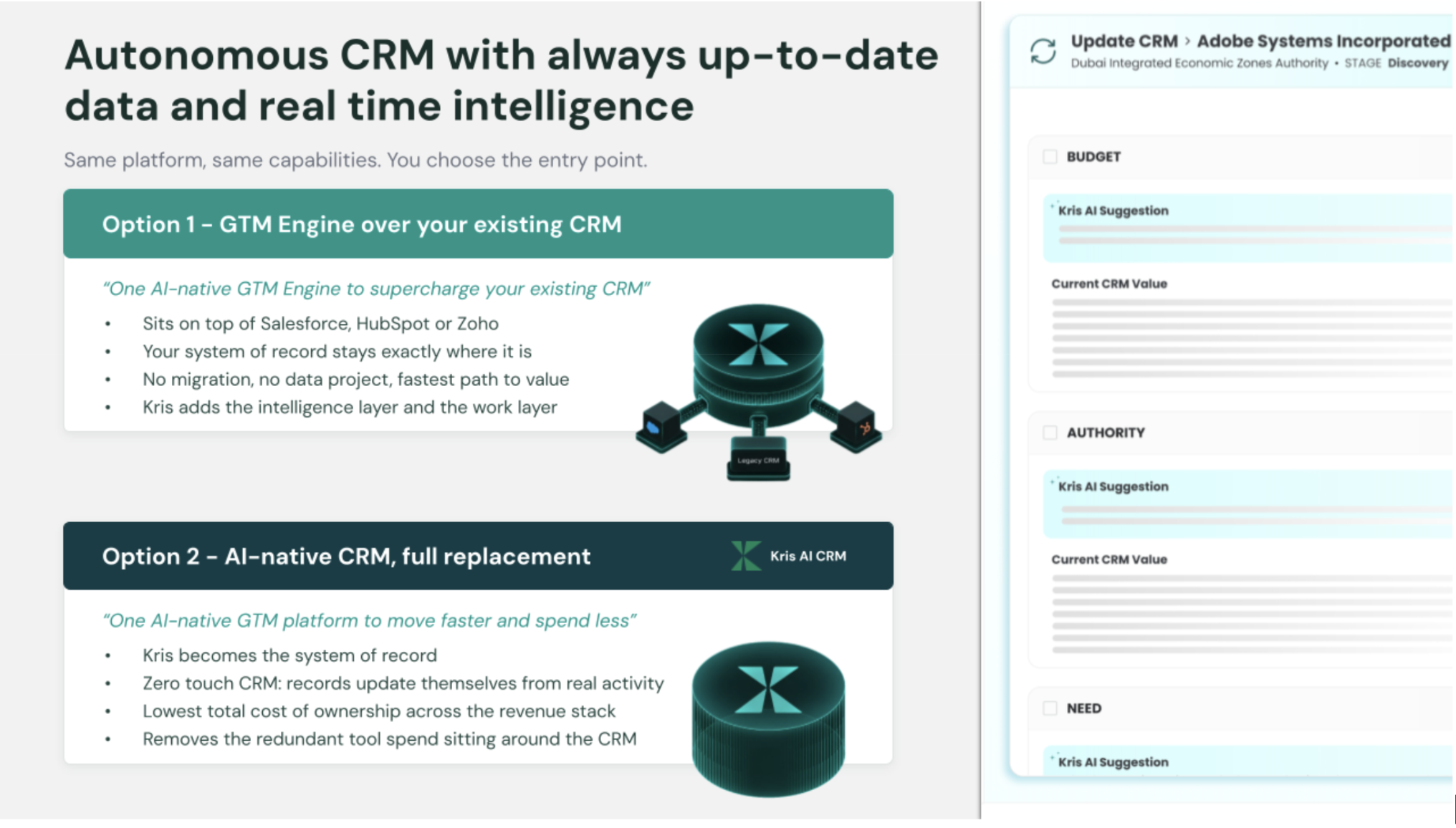
This means organisations can introduce Kris without having to discard the data, workflows, or CRM infrastructure they have already invested in.
Use Kris the way that fits your organisation
You also choose how you want to use Kris. There are two approaches:
- Kris as the base: Use Kris as the primary system of record and revenue workspace for your team.
- Kris as an add-on: Keep your existing CRM while connecting Kris to add AI-native intelligence and automated data maintenance.
This flexibility matters because replacing a CRM is rarely just a software decision. Existing data, processes, integrations, reporting, and team habits all have to be considered. You should be able to adopt an AI CRM without making your existing CRM investment irrelevant.
How to Choose Between an AI CRM and a Traditional CRM
There is no universal winner. The right choice depends on where your current constraints are.
Choose a traditional CRM if:
- You primarily need structured recordkeeping.
- Your processes are stable.
- Your customer data changes relatively slowly.
- Manual control is important.
- Your team maintains strong data hygiene.
- Your primary need is a reliable shared database.
Consider an AI-enabled CRM if:
- You already have significant investment in an existing CRM.
- You want AI assistance without changing your core system architecture.
- Your immediate priorities are AI summaries, content generation, predictions, or recommendations.
- Your organisation wants to introduce AI incrementally.
Consider an AI-native CRM if:
- CRM maintenance is itself a major operational burden.
- Your records become stale between manual updates.
- Your team struggles to maintain complete customer context.
- Intelligence is limited by incomplete data.
- You want the system to capture and maintain more information from work automatically.
- You need current, traceable context rather than periodic database updates.
The decision should be based on which operating problem needs to change.
The Real Shift Is Who Maintains the Record
Traditional CRM solved a foundational business problem: creating a shared place to record customer relationships.
AI CRM changes what can happen next. It can reduce manual work, help maintain current information, interpret patterns, and surface context that would otherwise require significant human effort to reconstruct. But buyers should look beyond whether a CRM simply has AI features.
The more useful question is “How much work does your team still have to do just to make the system trustworthy?”
A traditional CRM can be the right answer when structure and manual control are enough. An AI-enabled CRM can add intelligence to an existing operating model. An AI-native CRM represents a more fundamental shift.
From a database your team maintains to a system of record designed to help maintain itself - that is the real difference between AI CRM and traditional CRM.
FAQs About AI CRM vs. Traditional CRM
1. What is the difference between AI CRM and traditional CRM?
The main difference between AI CRM and traditional CRM is the role AI plays in maintaining and interpreting customer information. Traditional CRM software primarily depends on users to enter and update records, while AI CRM can automate parts of data capture, enrichment, analysis, and guidance.
2. Is AI CRM better than traditional CRM?
Not always. Traditional CRM can be a better fit for organisations with simple, stable processes and strong data discipline. AI CRM becomes more valuable when manual data maintenance, stale records, fragmented context, or difficulty interpreting large volumes of information become operational constraints.
3. Can a traditional CRM have AI?
Yes. Many established CRM platforms now include AI capabilities such as generative assistants, predictions, summaries, and recommendations. This is often described as an AI-enabled CRM. An AI-native CRM goes further by designing AI into how the system captures, maintains, and interprets the underlying record.
4. What is the biggest advantage of an AI CRM?
One of the biggest advantages is reducing the gap between work happening and the CRM accurately reflecting that work. When information can be captured, maintained, and interpreted with less manual effort, teams can spend less time on administrative reconstruction.
5. Does AI CRM replace sales reps?
No. AI can assist with research, administration, analysis, and prioritisation, but sales still requires human judgement, relationship-building, negotiation, and accountability. The goal is generally to reduce non-selling work rather than remove the human seller.
6. When should a company switch from a traditional CRM to an AI CRM?
Consider switching when manual CRM maintenance becomes a persistent problem, records frequently become stale, managers do not trust pipeline data, customer context is fragmented across tools, or teams spend significant time reconstructing information before they can act.
The Real Shift Is Who Maintains the Record
Traditional CRM solved a foundational business problem: creating a shared place to record customer relationships.
AI CRM changes what can happen next. It can reduce manual work, help maintain current information, interpret patterns, and surface context that would otherwise require significant human effort to reconstruct. But buyers should look beyond whether a CRM simply has AI features.
The more useful question is “How much work does your team still have to do just to make the system trustworthy?”
A traditional CRM can be the right answer when structure and manual control are enough. An AI-enabled CRM can add intelligence to an existing operating model. An AI-native CRM represents a more fundamental shift.
From a database your team maintains to a system of record designed to help maintain itself - that is the real difference between AI CRM and traditional CRM.