

It's Monday morning. Your sales team opens the CRM. One prospect is now a VP instead of a Director. Another left the company three months ago. A third has a new email address. And half the accounts your SDRs are supposed to prioritize are missing the information they need to decide who to contact first.
Welcome to CRM data decay. You can fix it with another spreadsheet, another data cleanup project, and another afternoon spent asking reps to update records. Or you can build a system that keeps doing the work after the cleanup is over. That's where CRM data enrichment comes in.
TL;DR
- CRM data enrichment adds missing information to customer and prospect records, but enrichment alone does not keep your CRM accurate.
- CRM data decays constantly as people change jobs, companies evolve, and contact and firmographic information becomes outdated.
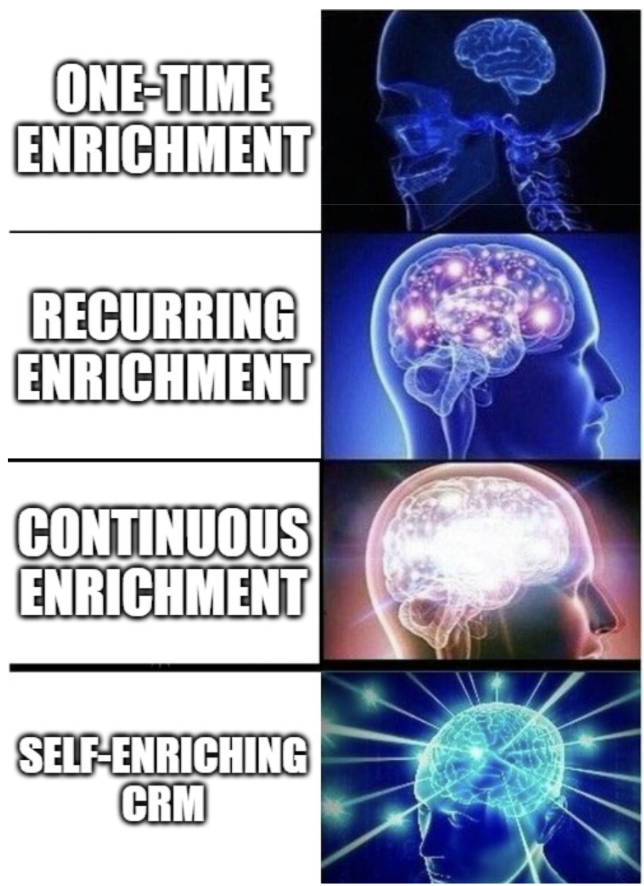
- One-time enrichment creates a clean snapshot. Continuous enrichment keeps records current through monitoring, change detection, and automatic updates.
- A strong B2B CRM data enrichment workflow should prioritize revenue-critical fields, validate information, handle conflicts, remove duplicates, and track both completeness and freshness.
- AI CRM data enrichment can go beyond filling fields by interpreting context, connecting information, and identifying meaningful changes.
- The ideal end state is a self-maintaining CRM where enrichment becomes part of the system of record instead of another manual RevOps task.
What is CRM Data Enrichment?
CRM data enrichment is the process of adding missing information to existing customer and prospect records, updating outdated information, and improving the completeness of CRM data using external sources.
A basic CRM record might contain name, email address, company, job title, and interaction history
Enrichment can add information such as:
- Company size
- Industry
- Revenue
- Location
- Seniority
- Direct phone number
- Technology used
- Company growth signals
- Job changes
- Other relevant business information
The result is a more complete record that gives sales, marketing, and RevOps teams more context before they act.
For example, instead of seeing:
Jake Simmons, VP Sales, Acme
your team might have:
Jake Simmons, VP Sales, Acme, 500 employees, SaaS, recently funded, uses Salesforce, based in Singapore
That additional context can influence who your team prioritizes, how they segment accounts, and how they personalize outreach. The key difference is that modern CRM data enrichment should not only add more data but also help keep the information your team already relies on accurate and current.
CRM Data Enrichment vs. Data Cleansing
CRM data enrichment and data cleansing are related, but they solve different problems.
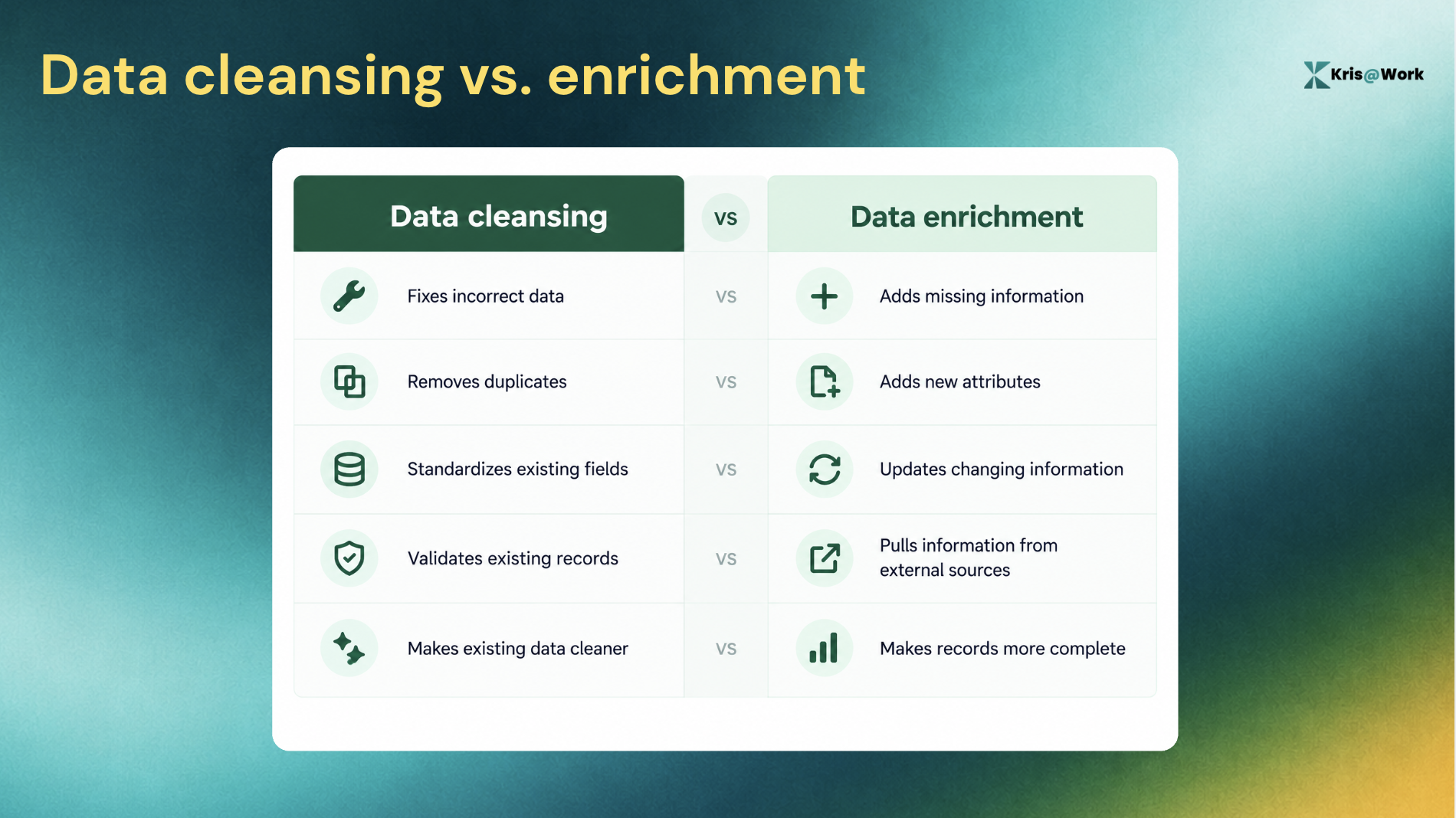
For example, changing "United States," "USA," and "US" into one standardized value is data cleansing.
Adding company revenue, employee count, industry, and technology stack to the record is data enrichment.
You generally want to clean the foundation before enriching it. Otherwise, you risk adding more information to records that are already duplicated, incorrectly matched, or poorly structured.
But there is a third problem that both processes can miss: Data changes. That is where continuous enrichment becomes important.
Why CRM Data Goes Bad Even After You Clean It
A CRM record is a snapshot of reality. Reality does not stay still.
People change jobs. Companies acquire other companies. Teams restructure. Executives get promoted. Email addresses become inactive. Companies open new offices or change their technology stack.
One-time enrichment can make your database accurate today. It cannot guarantee that it will still be accurate six months from now.
One recent CRM enrichment analysis cites an estimate that around 30% of B2B contact data changes each year. Another one frames CRM data as something that continuously decays as people change jobs, contact details change, and companies restructure.
That creates a familiar RevOps cycle:
Enrich CRM → database looks clean → information changes → records become stale → team notices problems → manual cleanup → database looks clean again
The problem is that cleanup is being treated as an event instead of a process.
What Data Should You Enrich in a B2B CRM?
The right enrichment strategy depends on what your sales and marketing teams need to qualify, segment, route, prioritize, and engage accounts.
1. Contact data
Contact enrichment helps your team understand who the person is and how to reach them.
Common fields include:
- Full name
- Job title
- Department
- Seniority
- Work email
- Phone number
- LinkedIn profile
- Current company
2. Firmographic data
Firmographic enrichment adds information about the organization.
Common fields include:
- Industry
- Employee count
- Revenue
- Headquarters
- Company location
- Growth stage
- Funding information
This data can help teams determine whether an account fits their ICP.
3. Technographic data
Technographic data tells you what technologies an organization uses.
For example:
- CRM
- Marketing automation platform
- Sales engagement software
- Analytics tools
- Cloud infrastructure
- Other relevant business technologies
This can be particularly useful when your product integrates with or replaces an existing technology.
4. Intent and behavioral signals
Enrichment can also bring context around what an account or contact is doing.
Depending on the system and available data, this can include:
- Website activity
- Content engagement
- Research activity
- Buying signals
- Recent company events
The benefit is being able to answer questions such as:
- Does this account fit our ICP?
- Who should we contact?
- Is anything changing at the account?
- Is there a reason to engage now?
CRM enrichment platforms commonly combine contact, firmographic, technographic, and intent information for this reason.
How Does CRM Data Enrichment Work?
At a basic level, CRM enrichment connects your internal records with external sources and uses matching and validation to add or update information.
The workflow looks like this:
CRM record > identify > match > enrich > validate > update
Here’s what happens at each stage.
Step 1: Identify the record
The system starts with information already available in your CRM.
This could be:
- Name
- Company
- Domain
- LinkedIn URL
The more reliable the identifiers, the easier it is to match the record to external information.
Step 2: Match the record
The enrichment system searches external data sources for a matching person or company. For example, an email domain might identify the company while the person's name and role help identify the contact.
Step 3: Find additional information
Once the record is matched, the system can retrieve additional attributes such as company size, industry, job title, contact information, or technology data.
Step 4: Validate the information
Enrichment should not mean blindly replacing everything in your CRM. The system needs to determine whether the information is relevant, current, and appropriate to update. This becomes particularly important when multiple sources disagree.
Step 5: Write the information back to the CRM
Once the data passes the relevant rules, the enriched information can be written into the appropriate CRM fields.
Step 6: Keep watching for changes
This is the step that turns enrichment into a continuous data-quality system. Instead of stopping after the first update, the system watches for meaningful changes and refreshes the record when necessary. That last step is what separates "we enriched our CRM" from "our CRM stays enriched."
How to Automate CRM Data Enrichment
A scalable enrichment workflow does not require RevOps to constantly run manual audits.
Instead, build enrichment into the lifecycle of the record.
1. Enrich new records automatically
When a new contact enters the CRM, enrich it before it reaches the next stage of your workflow.
For example:
Form submission → CRM → enrichment → routing → sales
This gives sales more context without asking the rep to research the prospect manually.
2. Enrich your existing database
Your existing CRM is usually where the biggest data-quality gaps live.
Prioritize records that matter most, such as:
- Open opportunities
- Active customers
- High-value accounts
- Recent leads
- Strategic ICP accounts
- Records used in active campaigns
You do not necessarily need to enrich every record at the same time.
3. Define which fields matter
Do not create an enrichment process simply because you can populate more fields.
Ask:
- Which fields influence lead routing?
- Which fields define our ICP?
- Which fields influence personalization?
- Which fields affect segmentation?
- Which fields become outdated frequently?
- Which fields influence revenue decisions?
The answer gives you your enrichment priorities.
4. Establish update rules
Decide what happens when new data conflicts with information already in your CRM.
For example:
- Should a new job title replace the existing title?
- Should a verified email replace an unverified email?
- Should manually entered information always take precedence?
- Which sources should be trusted for which fields?
- When should a record require human review?
Governed enrichment is important because automation without rules can simply create a faster way to introduce bad data.
5. Monitor records for change
Once a record is enriched, it should not necessarily be considered finished. Monitor the fields that change frequently or have the biggest impact on your workflows.
6. Re-enrich when something changes
When a meaningful change is detected, update the relevant record.
That means your CRM gradually becomes a system that maintains itself, rather than a database your RevOps team periodically has to repair.
How AI changes CRM data enrichment
AI CRM data enrichment goes beyond simply appending predefined fields. Traditional enrichment generally asks what information is missing from this record. AI can help answer a broader question like what information we have tell us about this record.
For example, a traditional enrichment workflow might add: Job title: VP Sales
An AI-powered system could use that information alongside company context, previous interactions, and other available signals to provide a more useful understanding of the account.
The distinction can be summarized like this:
| Traditional enrichment | AI-assisted enrichment |
|---|---|
| Finds predefined fields | Interprets broader context |
| Adds missing information | Connects information across records |
| Updates defined attributes | Can surface meaningful changes |
| Follows predefined rules | Can help interpret unstructured information |
| Focuses on completeness | Focuses on completeness and context |
But AI does not eliminate the need for reliable data sources. Better reasoning cannot compensate for bad inputs. The quality of AI-driven sales workflows still depends on the quality of the CRM data underneath them.
How to Measure CRM Data Quality
If you want to improve CRM data quality, you need to measure it. Start with a baseline and track the fields that matter most to your business.
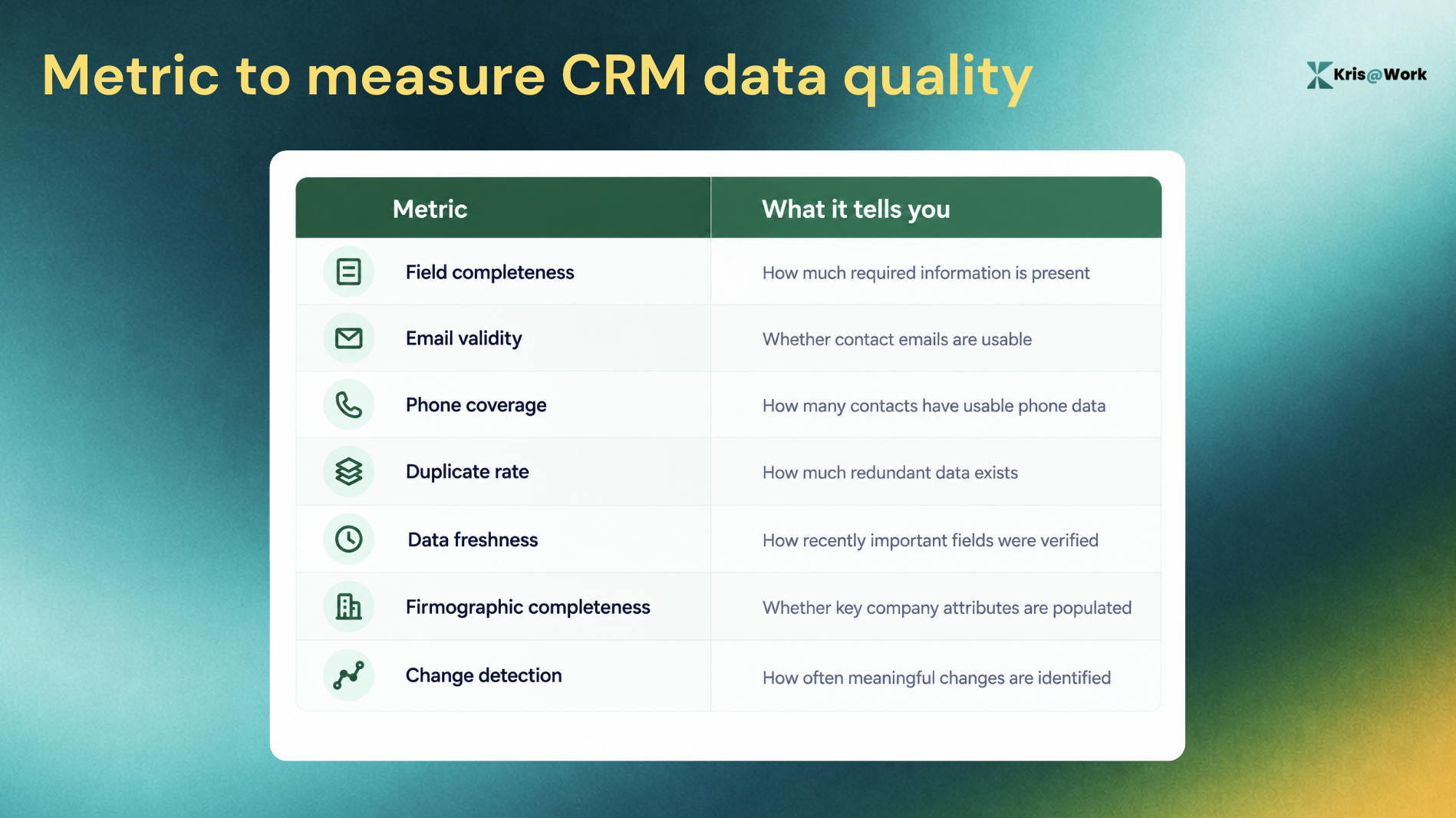
But, completeness is not the same as freshness.
This distinction is easy to miss. Suppose 95% of your contacts have a job title. That sounds good. But if 20% of those titles are outdated, the database is still creating problems. A better question is: How much of our important CRM data is both complete and current? That is a much more useful measure of CRM health.
Common CRM Data Enrichment Mistakes
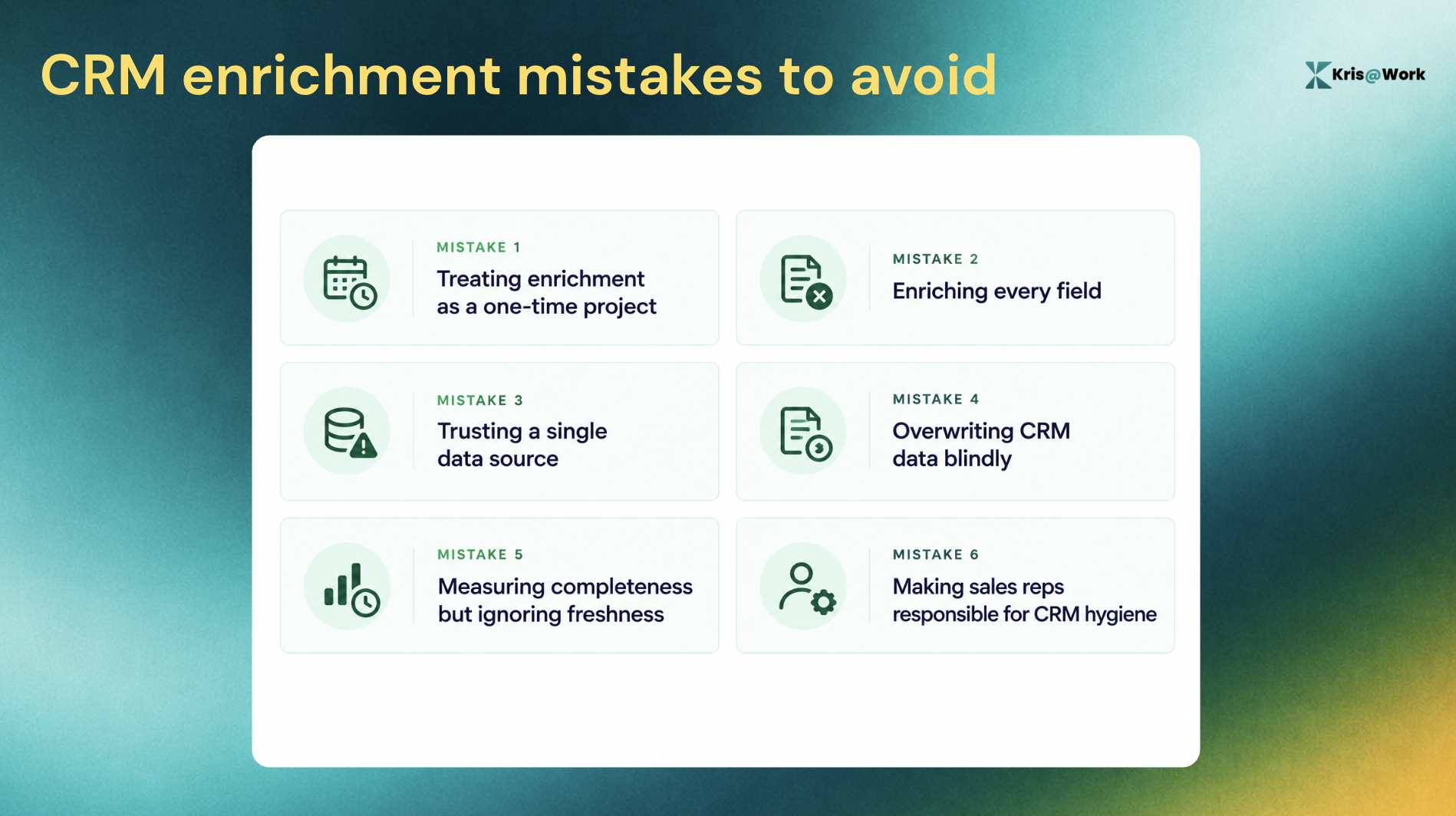
Mistake 1: Treating enrichment as a one-time project
You enrich the database once and assume the problem is solved.
Better approach: Build recurring enrichment and change detection into the CRM workflow.
Mistake 2: Enriching every field
More data does not automatically mean better data.
Better approach: Prioritize fields that affect routing, segmentation, qualification, personalization, and revenue decisions.
Mistake 3: Trusting a single data source
No external source is guaranteed to have every field for every record.
Better approach: Use appropriate sources and validation rules for different data types.
Mistake 4: Overwriting CRM data blindly
An automated update can create problems if the system does not know which information to trust.
Better approach: Define source priority, update rules, and human-review conditions.
Mistake 5: Measuring completeness but ignoring freshness
A field can be populated and still be wrong.
Better approach: Track when important information was last verified or updated.
Mistake 6: Making sales reps responsible for CRM hygiene
Your reps should not have to research every prospect just to keep the database usable.
Better approach: Automate routine enrichment and reserve human effort for decisions that actually require human judgment.
A Practical CRM Data Enrichment Workflow
If you are building this from scratch, keep the workflow simple.
Phase 1: Define what good data looks like
Start by identifying:
- Required CRM fields
- ICP attributes
- Revenue-critical fields
- Frequently changing information
- Data sources you trust
- Fields that require human approval
Phase 2: Fix the existing database
Clean duplicates and obvious errors first. Then enrich the records that matter most. Start with active opportunities, strategic accounts, recent leads, and other high-value records.
Phase 3: Automate new records
Every new contact or account should enter your enrichment workflow automatically. The goal is to prevent your CRM from accumulating new incomplete records.
Phase 4: Add change detection
Identify which attributes should trigger a refresh.
For example:
- Contact changes company → update contact
- Contact gets promoted → update title
- Company information changes → refresh firmographics
- Important account signal appears → update account context
Phase 5: Measure the system
Track completeness, freshness, duplicates, verification, and other metrics relevant to your workflows. Then improve the process based on where the biggest gaps remain. The important part is that this is a loop, not a project.
Can an AI CRM Keep Data Enriched Automatically?
Yes, when enrichment is built into the CRM rather than treated as a separate cleanup task.
With a traditional setup, the workflow can look like:
CRM → enrichment platform → data returned to CRM
The CRM stores the information, while another system is responsible for keeping it current. A self-enriching CRM takes a different approach:
CRM → detect missing or changed information → enrich → update the record
That makes enrichment part of the system of record itself.
Kris AI CRM: A CRM that Enriches Itself
Most CRMs are designed to store customer information. The problem is that storing information is easy. Keeping it accurate is the hard part.
Your CRM shouldn't need a RevOps project every time a contact changes jobs or an account's information becomes outdated. It should be able to keep its own records current.
Kris AI CRM is the system of record, built to continuously maintain the customer data your revenue team works with. It self-enriches contact titles, firmographics, and contact information, while detecting changes that can make existing records outdated.
Here’s what Kris AI CRM workflow looks like:
New contact → enrichment → CRM → change detected → record updated
Instead of asking your team to constantly check whether information has changed, the CRM can surface and maintain the information as part of the system of record.
It also lets users ask plain-language questions about deal health, ARR projections, and pipeline, with evidence attached to the answers. So the value isn't simply "more data in your CRM." It's less manual work required to keep the data useful.
Why this matters for RevOps
When CRM maintenance becomes automated, RevOps can spend less time chasing missing fields and stale records and more time improving the systems that actually drive revenue.
Sales reps get current customer context without having to research every record themselves, and the CRM becomes more than a place where information goes to be stored. It becomes a system that actively maintains the information inside it.
CRM Data Enrichment Checklist
Before you automate your enrichment workflow, make sure you can answer these questions:
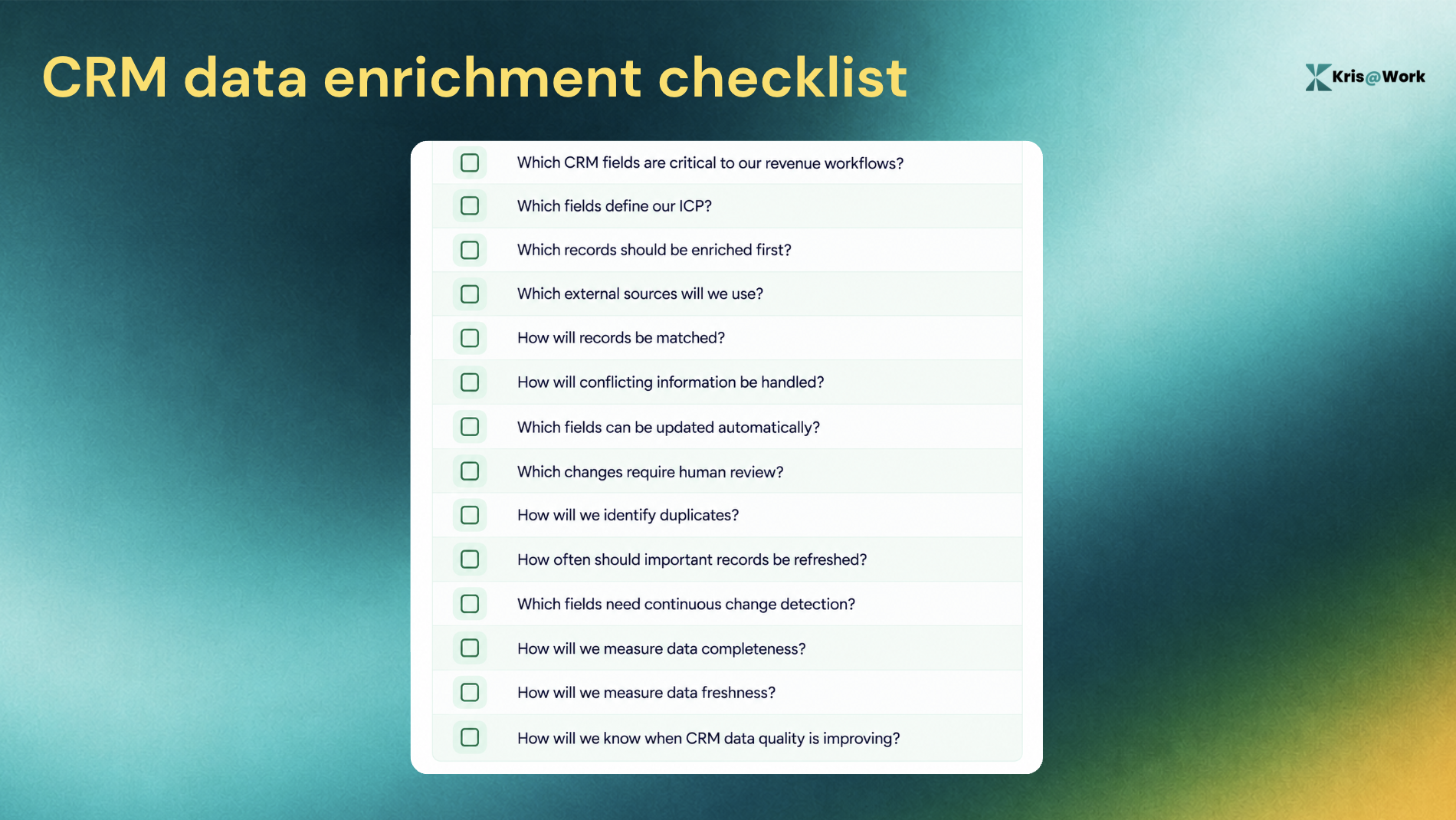
If you cannot answer these questions, adding another enrichment provider may not solve the underlying problem.
Summing It Up
CRM data enrichment is often presented as a way to fill missing fields. That is only half the problem. The other half is data decay. A person changes jobs. A company changes. A contact becomes unreachable. An account's technology stack evolves. Your CRM needs to keep up. That is why the most useful approach combines clean data, enriched data, verified data along with continuous change detection. The goal is to keep the CRM useful even after the world changes.
And for RevOps teams, that is the real promise of automated CRM data enrichment: less time spent repairing records, fewer stale assumptions, and a system of record that can keep pace with the customers and prospects it represents.
FAQs About CRM Data Enrichment
1. What is CRM data enrichment?
CRM data enrichment is the process of adding, updating, and verifying information in customer and prospect records using external data sources. It can add details such as job titles, company size, industry, revenue, contact information, and technology data.
2. Why is CRM data enrichment important?
CRM data becomes incomplete and outdated as customers, companies, and contacts change. Enrichment helps sales, marketing, and RevOps teams work with more complete and relevant customer information.
3. What is the difference between CRM data enrichment and data cleansing?
Data cleansing fixes problems in existing data, such as duplicates, formatting inconsistencies, and incorrect information. Data enrichment adds new information or updates existing records using external sources.
4. How does CRM data enrichment work?
A typical enrichment workflow identifies a CRM record, matches it against external data sources, retrieves relevant information, validates it, and writes the updated data back to the CRM. More advanced systems can continuously monitor records for changes and trigger re-enrichment.
5. What data can be enriched in a CRM?
Common enrichment fields include contact details, job title, seniority, company size, industry, revenue, location, technology stack, and relevant company or buying signals.
6. How often should CRM data be enriched?
There is no single refresh interval that works for every field. Frequently changing information should be monitored more often, while less volatile information can be refreshed periodically. The most important records and revenue-critical fields should generally receive the highest priority.
7. What is AI CRM data enrichment?
AI CRM data enrichment uses AI to help interpret, connect, and contextualize customer information in addition to filling predefined fields. It can help identify meaningful changes and make enriched CRM data more useful for revenue workflows.
8. How do you maintain CRM data quality?
Start by defining the fields that matter to your revenue workflows, then establish enrichment and validation rules, remove duplicates, monitor important records for changes, and measure both data completeness and data freshness.
9. Can CRM enrichment detect when a contact changes jobs?
Yes. A CRM enrichment system with change detection can identify changes such as a contact moving to another company or receiving a new title, then update the relevant CRM record when the change is verified.
10. Can CRM data enrichment be automated?
Yes. Enrichment can be triggered automatically when new records enter the CRM and can also be used to continuously monitor existing records. The strongest workflows combine automated enrichment with validation and rules for handling conflicting information.
Related Blog Posts

11 Best Apollo.io Alternatives in 2026 (Compared)
1 July 2026
AI CRM vs Traditional CRM: What's the Difference? (2026)
9 September 2026