Nobody buys a CRM hoping to spend more time updating it. But that's what happens. Leads sit unassigned for hours. Deals stall at the same stage for weeks with nobody noticing. Reps spend their Friday afternoon typing in call notes they should've logged on Monday.
CRM workflow automation is what fixes that: using triggers, conditions, and actions inside your CRM so the system does the routine work the moment something happens, instead of waiting for someone to remember to do it. A lead comes in, and it's scored and routed in seconds. A deal goes quiet, and a rep gets flagged before it's a lost cause. A deal closes, and onboarding starts without anyone lifting a finger.
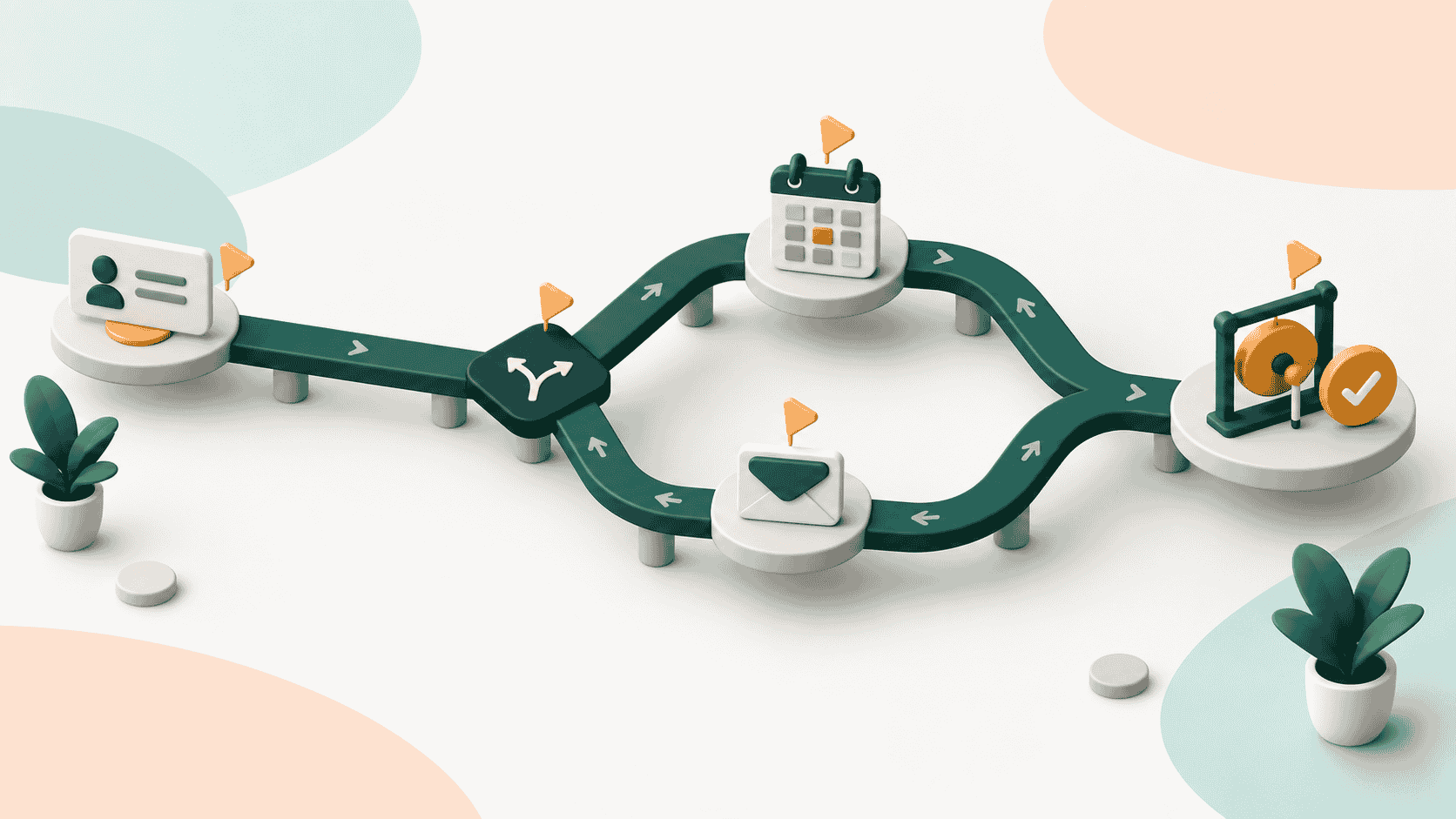
The mechanics are simpler than they sound: trigger, condition, action. Everything in this guide is a variation on that pattern, from the basic workflows worth automating first to where hand-built rules start breaking down as your team scales.
What is CRM Workflow Automation?
CRM workflow automation is the use of triggers, conditions, and actions inside your CRM to run tasks automatically: a lead comes in, gets scored, and gets assigned. A deal stalls, and a rep gets a reminder. A deal closes, and onboarding starts. Instead of someone doing each step by hand, the system runs the rule the moment the trigger fires.
That's the core pattern behind almost every CRM workflow you'll build: trigger, condition, action. Everything below is a variation on it.
What Actually Gets Automated
A workflow isn't one big automation. It's usually three small pieces working together:
- Trigger: Something happens. A form gets submitted, a deal moves stages, a meeting gets logged.
- Condition: A rule checks the details. Deal size over $50K, no activity in 7 days, lead from a target industry.
- Action: The system responds. Assigns an owner, sends an email, creates a task, updates a field, notifies a manager.
Set those three correctly and the workflow runs itself, every time, the same way. That consistency, not the individual automation, is the real payoff. A rep who remembers to follow up 8 times out of 10 is doing a good job. A workflow does it 10 out of 10.
Common CRM Workflows Worth Automating
Most teams start in the same five places:
- Lead capture and routing: A lead fills out a form, and the CRM creates the record, scores it, and assigns it to the right rep based on territory, deal size, or industry, without anyone touching it manually.
- Follow-up sequencing: After a meeting or a demo, the system enrolls the contact in a follow-up sequence and creates a reminder task if there's no reply within a set window.
- Deal stage updates: Instead of a rep remembering to drag a deal to the next column, the stage updates when a qualifying activity happens (a proposal sent, a contract signed) or gets flagged when a deal sits too long with no movement.
- Data enrichment: New contact and account fields get filled in automatically from enrichment tools rather than a rep looking up firmographic details by hand.
- Post-sale handoff: When a deal closes, onboarding tasks get created and assigned to the success team automatically, so nothing sits in a queue waiting for someone to notice the deal closed.
How to Automate CRM Workflows, Step by Step
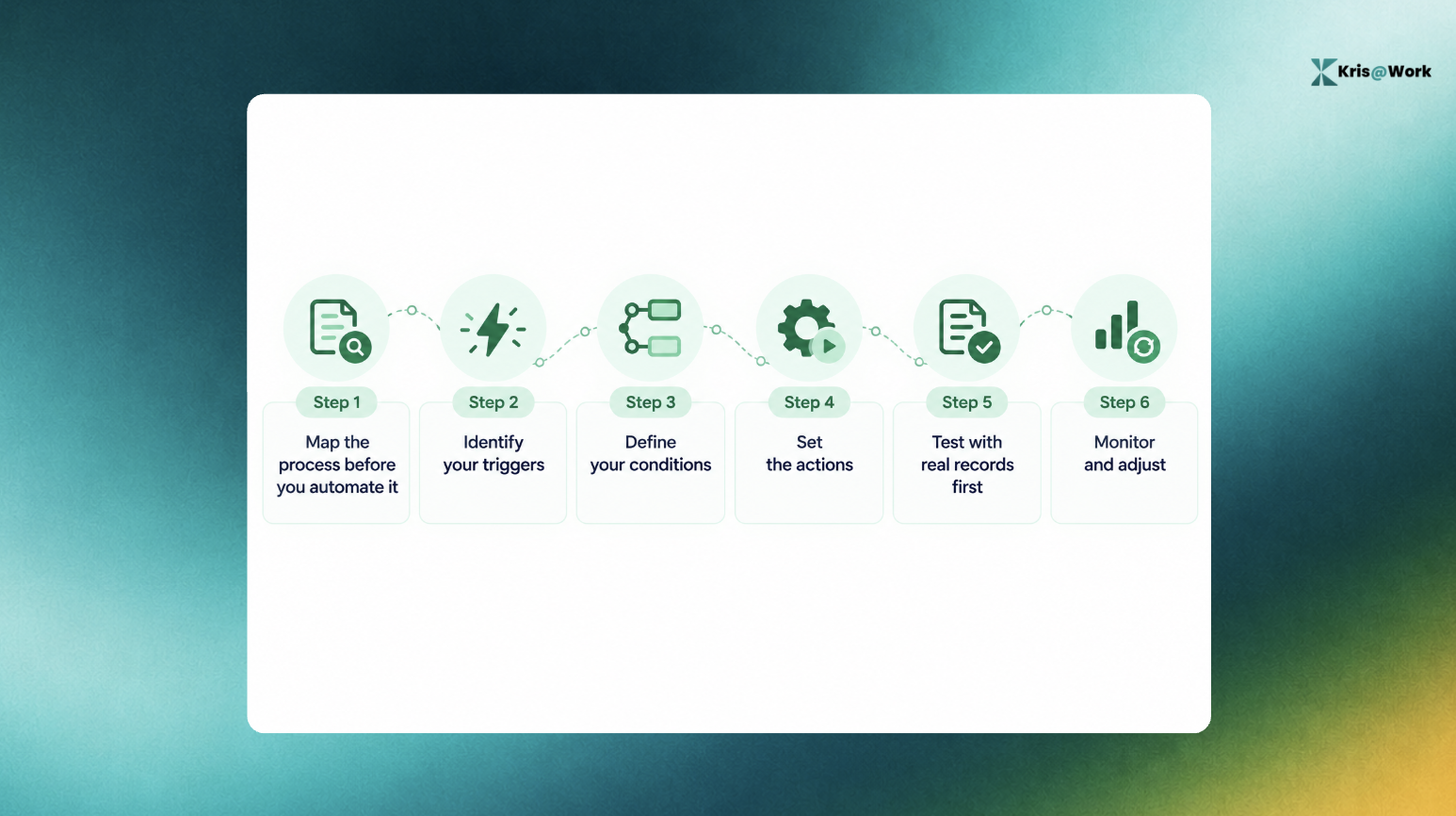
1. Map the process before you automate it
Write out what actually happens today, step by step, including who does each part and what triggers the next one. Don't design from memory. Sit with a rep and watch them work a lead from first contact to close, or pull up the last 10 deals that moved through the pipeline and trace the actual sequence of events.
Example: You think your lead process is "form fill → auto-assign → rep calls." But when you map it, you find reps are actually checking a shared inbox for form notifications and manually copying details into the CRM, because the auto-assign rule was built two CRM versions ago and quietly stopped firing. You'd never catch that without mapping the real process first.
2. Identify your triggers
Pin down the exact event that should kick off the workflow, not a general category of event. "A lead comes in" isn't a trigger you can build on. "A lead submits the demo request form on the pricing page" is.
Example: Instead of one trigger for "new lead," split it: form submission from the pricing page (high intent, route to a senior rep within 15 minutes) versus a lead added from a purchased list (lower intent, route into a nurture sequence instead of straight to a rep). Same event category, two different triggers because the intent behind them is different.
3. Define your conditions
Decide what should branch the workflow once the trigger fires. This is where you encode the judgment calls a rep would normally make in their head.
Example: A deal-stalled workflow shouldn't treat every deal the same. Condition it: if deal value is under $10K and there's been no activity in 7 days, send an automated check-in email. If deal value is over $50K and there's been no activity in 4 days, skip the email and alert the rep's manager directly. Same trigger (inactivity), two different actions because the conditions split on deal size.
4. Set the actions
Assign a rep, send an email, update a field, create a task, notify a manager. Keep each workflow to a handful of actions. A workflow with 15 steps chained together is one nobody can debug six months from now when it starts misfiring.
Example: For a closed-won deal, a lean workflow might be: update the deal stage, create three onboarding tasks assigned to the customer success rep, and send one internal Slack notification. Resist the urge to also trigger a survey, a contract archive step, and a commission calculation in the same workflow. Build those as separate, smaller workflows so a failure in one doesn't take down the rest.
5. Test with real records first
Run the workflow against a small batch of live data before turning it on for the whole team. Confirm the trigger actually fires when it should, the condition branches correctly, and the action lands where you expect.
Example: Before rolling out a new lead-routing workflow to all 20 reps, run it against the last 15 leads that came in and check the output manually. You might find that leads with no listed industry field default to the wrong routing rule, something you'd only catch by testing against real, messy data instead of a clean sample record.
6. Monitor and adjust
A workflow built for last quarter's process will quietly misfire once the process changes, and it won't announce that it's broken. Set a recurring check, monthly is reasonable for most teams, to review whether workflows are still doing what they were built to do.
Example: Six months after building the deal-stall workflow, your team adds a new "Negotiation" stage to the pipeline. The workflow was written to flag inactivity in "Proposal Sent," so deals sitting quiet in the new stage never get flagged at all. Nobody notices until a deal that should've closed goes cold. A monthly review would've caught the gap before it cost a deal.
Where Hand-Built Workflows Break Down
Rule-based automation works well for a specific action tied to a specific event. It gets harder to trust as the number of rules grows.
A few patterns show up in most teams that have been at this for a while:
- Rules go stale: The workflow was built for a sales process that's since changed. Nobody remembers to update it, so it keeps firing on outdated logic.
- Automation only runs if someone logs the activity first: A rule that says "if a call happens, update the stage" does nothing if the rep never logs the call. The CRM is only as current as the manual entry feeding it.
- Logic gets scattered: One rule lives in a workflow builder, another in a Zapier connection, a third in a spreadsheet someone built two years ago. Nobody has the full picture, and changes in one place quietly break another.
This is the gap modern CRMs are built to close: instead of writing rules that react to logged activity, the CRM updates itself directly from what happened, the call, the email, the meeting, without a rep needing to log anything first. Kris AI CRM works this way. Deal stages move based on evidence of what actually took place, not on a rep remembering to update a field, and it can sit on top of an existing Salesforce, HubSpot, or Zoho instance rather than requiring a migration. Teams using this approach report reclaiming meaningful time that used to go into manual CRM upkeep, though the exact number will depend on how manual your current process is.
Book a demo and see how it can help with your use case.
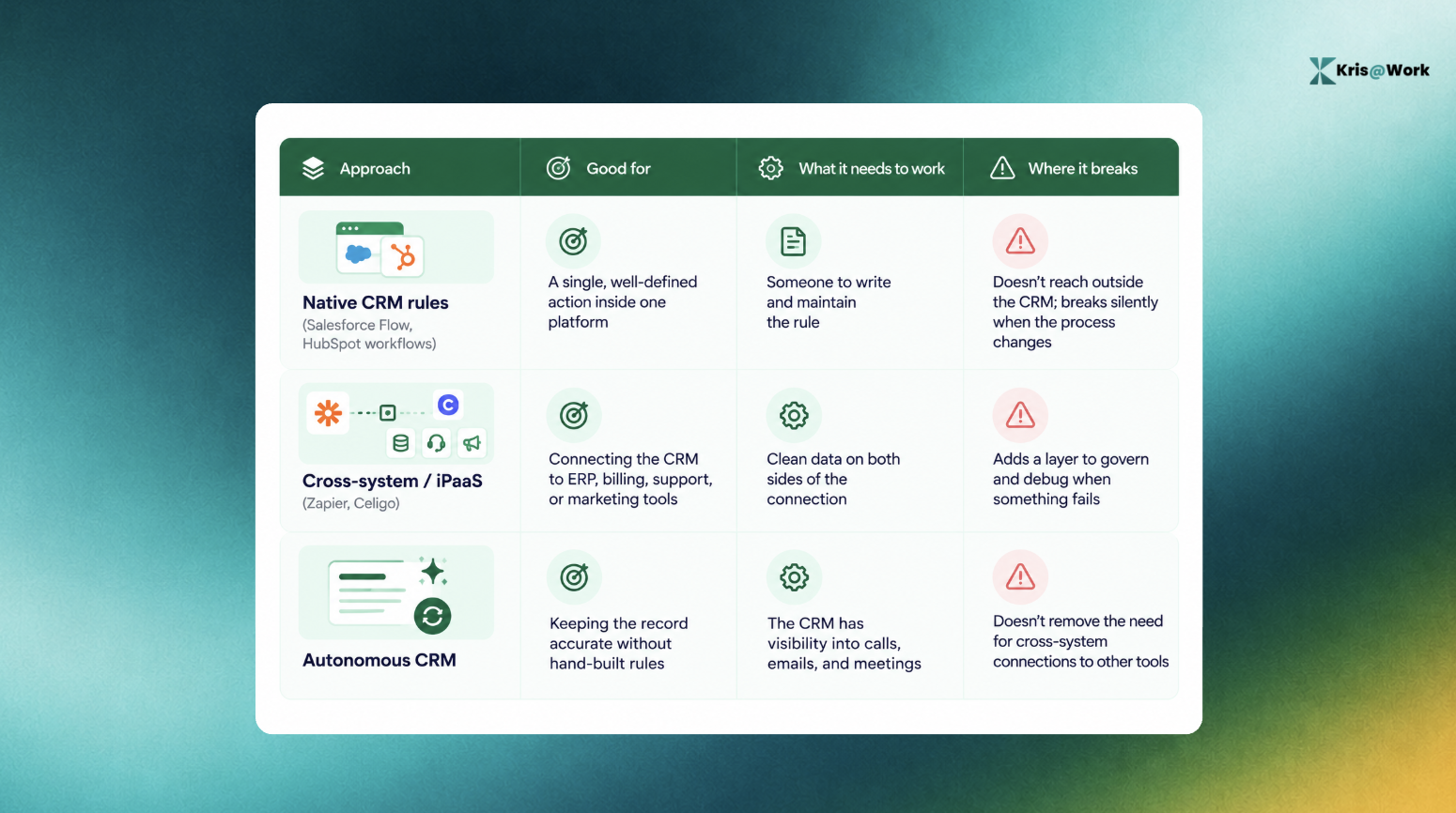
Native Rules vs. Cross-System Automation vs. Autonomous CRM
Three different layers solve three different problems. Most teams end up using more than one.
How to Measure Whether It's Working
A workflow is working if it changes a number you actually track, not just if it's technically running. Watch:
- Lead response time: How long between a lead coming in and a rep making contact.
- Percentage of fields updated without manual entry: A rising number here means less time reps spend on admin.
- Forecast accuracy: Automated stage updates should make the pipeline reflect reality more closely, which shows up as forecasts that hold up.
- Hours reclaimed per rep, per week: Worth tracking even roughly, since it's the number that justifies the investment to leadership.
FAQs About CRM Workflow Automation
1. What's the difference between CRM automation and workflow automation?
CRM automation is the broader term, covering everything from email syncing to reporting. Workflow automation specifically means trigger-based actions: something happens, and the system responds automatically.
2. Is CRM workflow automation only useful for large teams?
No. A five-person team benefits from basic lead routing and follow-up reminders as much as an enterprise team benefits from cross-system orchestration. The complexity should match the team's size, not the other way around.
3. What's the difference between sales and marketing CRM automation?
Sales automation focuses on routing, follow-ups, and pipeline movement. Marketing automation focuses on nurture sequences and lead scoring. Both work best when they're pulling from the same clean data.
4. Do I need to know how to code to set this up?
Most modern CRM workflow tools use no-code, drag-and-drop builders. Cross-system automation and custom logic sometimes need more technical setup, but the core sales and marketing workflows generally don't.
5. Does automating my CRM replace the need for reps to manage it?
No. Automation removes the manual admin around logging and updating records. It doesn't replace judgment calls like which deals to prioritize or how to handle an objection.