
Your CRM was supposed to help sales reps sell. Instead, your reps often spend their day feeding the CRM that is supposed to help them sell.
They enter notes. Update stages. Search for account information. Check which leads are worth pursuing. Reconstruct what happened on the last call. Dig through emails. Pull up old records. Switch between tools. Then, when they finally have enough context to act, the buying signal may already be cold. That is the problem an AI CRM is designed to change.
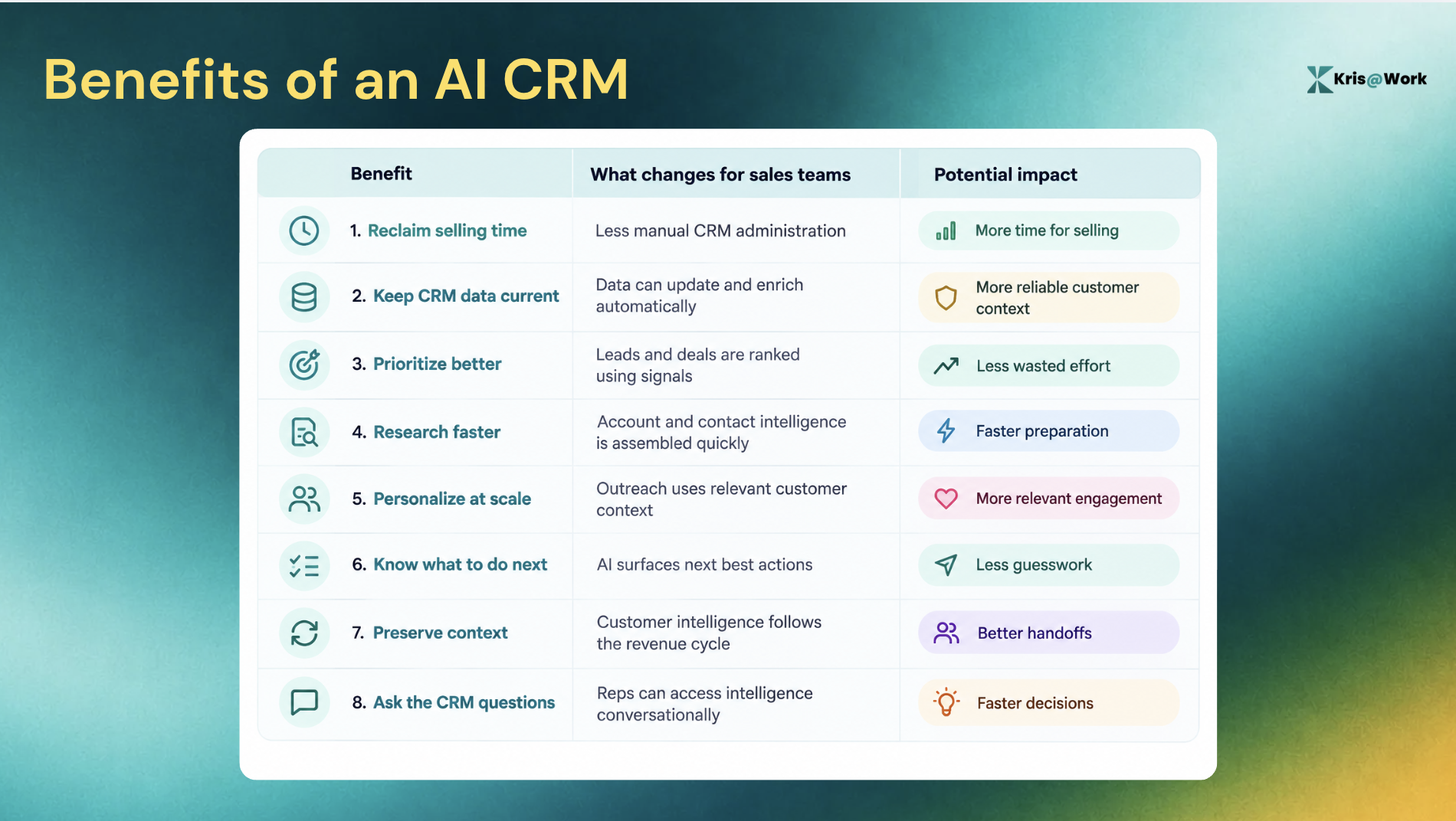
The biggest benefits of AI CRM are not simply that it adds a chatbot or generates an email. A good AI CRM can reduce manual CRM work, keep customer data current, surface the leads and deals that deserve attention, assemble research, recommend what to do next, and let reps access CRM intelligence in plain language.
The result is a shift from a CRM that records what happened to a system that helps the sales team understand what is happening and what to do about it.
Here are the eight benefits that matter most for sales teams evaluating an AI CRM in 2026.
TL;DR
- Measure time recovered: Start with CRM administration and research time before evaluating broader AI claims.
- Prioritize intelligence over novelty: The useful AI CRM is the one that helps reps decide what matters and what to do next.
- Demand explainability: Lead scores, deal health, and recommendations are more useful when they include evidence and reasons.
- Evaluate the whole workflow: Look at how AI handles the system of record, intelligence, and sales execution together.
- Build the business case around output: The goal is not more AI activity, but more useful selling capacity from the same team.
8 Benefits of an AI CRM - At a Glance
1. Reclaim selling time from CRM administration
Sales reps should not have to spend a significant part of their day acting as data-entry clerks. Yet traditional CRM systems depend heavily on reps to keep records updated. Calls need to be logged. Notes need to be added. Deal stages need to be changed. Contacts need to be updated. Follow-ups need to be created.
When that work does not happen, the CRM becomes stale. When it does happen, it takes time away from selling.
The broader productivity problem is significant. Research from Salesforce, Forrester, and McKinsey shows that 72% of rep time is spent on non-selling tasks.
An AI CRM can reduce that administrative burden by automatically converting customer interactions and activities into structured CRM data. The goal is not to make reps better at CRM administration. It is to make CRM administration require less rep effort in the first place.
That is one of the clearest advantages of AI CRM for a sales organization: more of the team's paid time can go toward conversations, relationships, discovery, negotiation, and closing.
2. Keep CRM data current without relying on rep memory
A CRM is only useful when its records reflect reality. That sounds obvious. In practice, it is difficult. A prospect changes jobs. A company grows. A new executive joins an account. Contact information changes. A deal progresses after a call. A buyer reveals a new requirement.
Traditional CRM workflows often rely on someone noticing the change and updating the appropriate field. That creates a dangerous dependency: The CRM knows what the rep remembers to tell it. AI changes that model. AI-powered CRM systems can automatically capture, update, and enrich customer information.
Kris AI CRM takes this approach further with self-enriching titles, firmographics, and contacts, plus change detection. It also supports evidence-based stage transitions and auto-disposition with a timestamped audit trail.
That creates a fundamentally different system of record. Instead of:
Rep learns something → remembers to update CRM → CRM reflects reality
You move toward:
Something changes → system detects it → customer record stays current
This matters because stale data does more than make a CRM untidy. It can lead to bad prioritization, outdated outreach, poor handoffs, and decisions based on information that is no longer true.
3. Prioritize the leads and deals that actually deserve attention
Most sales teams never have a shortage of things they could work on. They have a shortage of time to work on the right things.
A rep might have hundreds of leads and dozens of open opportunities. A traditional CRM can show all of them. It does not necessarily tell the rep which ones deserve attention right now. That is where AI-powered prioritization becomes valuable.
AI can evaluate signals such as engagement history, firmographic information, behavioral patterns, deal activity, and historical outcomes to help rank opportunities.
The important distinction is this: A CRM tells you what is in the pipeline. An AI CRM can help determine where to focus.
For example, instead of giving a rep 40 open deals and asking them to work through the list, an AI CRM can surface the opportunities showing meaningful changes or risks and explain why they matter.
Kris Capture supports A+ to F lead grading with reason codes, and BANT surfaced before outreach. Kris Close applies A+ to F health grading and contributing signals to open opportunities, alongside Next Best Moves for deciding what to work on.
That changes prioritization from a personal guessing exercise into a more consistent, signal-driven workflow.
4. Cut account research from hours to minutes
Research is always needed for good sales outreach. The problem is how much manual work it can take.
A rep might open the company website, LinkedIn, the CRM, an enrichment platform, news sources, intent data, old emails, call notes, and several other tabs just to answer basic questions:
- Why this account?
- Why now?
- Who should I contact?
- What changed?
- What does this buyer care about?
- What should I say?
AI CRM can compress that process by bringing the relevant context together.
Kris@Work, for example, supports account and contact research, enrichment from 80+ sources, why-now synthesis, signal evidence, and lead grading.
The potential outcome is significant and can save up to 98% research time per account, but this should be treated as a potential outcome rather than a guaranteed result. The important benefit is context compression.

Instead of spending the first part of every prospecting session collecting information, reps can spend more of that time deciding what the information means and having the conversation.
Traditional research vs. AI-assisted research
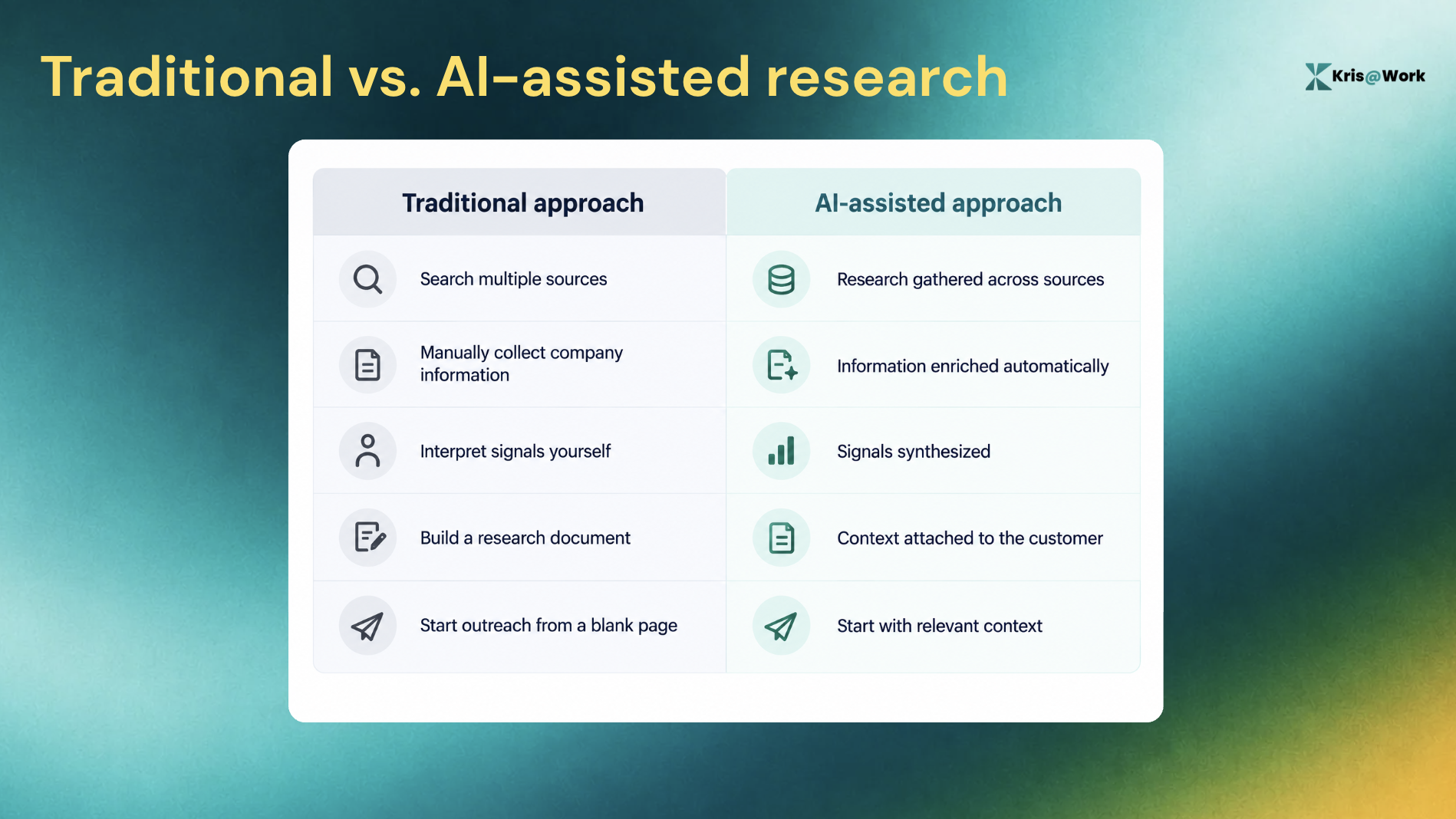
That is one of the most practical AI CRM benefits for teams that expect reps to research before every meaningful interaction.
5. Personalize outreach without doing everything manually
"AI personalization" can sound impressive while producing very generic emails. But that's not the benefit sales teams actually want. The real benefit is being able to use specific customer context without requiring a rep to manually research and write every message from scratch.
An AI CRM can bring together information about the account, buyer, engagement, timing, and previous interactions, then use that context to help generate relevant outreach.
The distinction matters, because AI should not mean "Generate 500 emails." It should mean "Understand 500 prospects well enough to help a rep communicate with each one more relevantly."
6. Know the next best action instead of staring at another dashboard
A dashboard can tell a sales rep that a deal exists. It can tell them the stage, last activity, expected close date, etc.
But the rep still has to figure out “What should I do next?”
That is where AI CRM starts to move beyond traditional CRM.
Kris@Work includes Next Best Moves, which helps reps determine which open deals to work and the specific move to make on each. It also provides Deal Intelligence and a Deal Signal Detection Engine that can surface relevant signals and guidance within the deal.
That creates a different workflow that goes from:
See the pipeline → inspect records → interpret information → decide what to do
To:
See the important signal → understand why it matters → get guidance → take action
The difference is that CRM stops being just a place where salespeople look up information and becomes a place where intelligence helps them act on information.
7. Preserve customer context across the revenue cycle
Customer context should not disappear every time ownership changes. But that happens quite often.
- An SDR qualifies a prospect and hands it to an AE.
- The AE runs discovery.
- A new stakeholder joins.
- The deal changes direction.
- Someone else takes over the account.
Each handoff creates an opportunity for information to get lost. AI CRM can help preserve that context by continuously maintaining the customer record and making relevant intelligence accessible to the people who need it.
For Kris, this connects directly to the idea of three connected layers:
- System of Work
- System of Intelligence
- System of Record
Kris AI CRM acts as the system of record beneath the broader Kris workflow, while Kris Capture and Kris Close bring intelligence and action into prospecting and deal execution.
The benefit is simple - the customer should not have to explain themselves again because your internal systems lost the context.
8. Ask your CRM questions in plain language
Most CRM intelligence is trapped behind filters, reports, fields, dashboards, and predefined views. AI makes the interface much more natural.
Instead of figuring out how to construct a report, a rep or sales leader can ask:
- Which deals are most at risk?
- What changed in this account?
- Which opportunities need attention today?
- What happened in the last customer conversation?
- What is the health of this pipeline?
- Which accounts have new buying signals?
Conversational CRM is already emerging as a major AI CRM pattern. It allow teams to access and update customer data through natural language, while its AI capabilities can retrieve interaction history, update fields, and generate meeting briefs.
Kris AI CRM supports plain-language answers on deal health, ARR projections, and pipeline, with evidence attached. All for free.
The important part is not the novelty of chatting with software; it’s the reduction in the distance between a business question and a useful answer.
A sales leader should not need to become a CRM administrator to answer a pipeline question. A rep should not need to navigate six screens to understand what changed at an account. That is one of the more meaningful advantages of AI CRM: making customer intelligence accessible to the people making customer decisions.
AI CRM benefits vs. Traditional CRM
The easiest way to understand the difference is to look at what each system expects from the sales team.
| Area | Traditional CRM | AI CRM |
|---|---|---|
| Data entry | Reps manually update records | AI can capture and update information |
| Customer records | Often static until someone edits them | Can be dynamically enriched and updated |
| Lead prioritization | Rules, lists, and rep judgment | AI can evaluate signals and rank opportunities |
| Research | Rep gathers information manually | AI can assemble and synthesize context |
| Outreach | Rep writes and schedules messages | AI can assist with contextual personalization |
| Pipeline management | Rep reviews dashboards and records | AI can surface risks and recommended actions |
| CRM queries | Filters, reports, and dashboards | Natural-language questions |
| Handoffs | Notes and manually maintained fields | Continuously maintained customer context |
| Rep workflow | CRM primarily records activity | CRM can help interpret information and guide action |
Is an AI CRM Worth it for Your Sales Team?
An AI CRM is worth evaluating if your sales team has any of these problems:
- Reps spend too much time updating CRM records.
- Customer data becomes stale unless someone remembers to update it.
- Reps research accounts across too many tools.
- Managers cannot easily identify which deals need attention.
- Salespeople spend too much time deciding what to work next.
- Important customer context gets lost during handoffs.
- Pipeline reviews depend heavily on manually entered information.
- Your team keeps adding tools without creating proportional selling capacity.
You may not need an AI CRM if your sales process is extremely simple, your team has minimal CRM administration, and your existing systems already solve the problems above effectively.
The point is to determine whether the cost of operating your current revenue system is greater than the cost of changing it.
Summing It Up
Traditional CRM asks salespeople to keep the system informed. AI CRM can use the information already available to help keep the system current, understand what matters, and guide the work that comes next. That is why the most important question is not, "Does this CRM have AI?" It’s “How much of the work between customer signal and sales action can the CRM now handle for you?”
FAQs About Benefits of AI CRM
1. What are the main benefits of an AI CRM?
The main benefits include reducing CRM administration, keeping customer data current, prioritizing leads and deals, speeding up account research, supporting personalized outreach, recommending next actions, preserving customer context, answering CRM questions in natural language, and increasing sales productivity.
2. How does an AI CRM save sales reps time?
An AI CRM can automate repetitive work such as record updates, data enrichment, call and meeting summaries, research, prioritization, and follow-up workflows. This reduces the amount of time reps spend operating the CRM and gives them more capacity for customer-facing work.
3. What are the advantages of AI CRM over traditional CRM?
Traditional CRM primarily stores and organizes customer information. AI CRM can go further by interpreting customer data, identifying signals, recommending actions, automating updates, and answering questions in natural language. The result is a CRM that can participate more actively in the sales workflow.
4. Why use an AI CRM instead of adding AI tools to an existing CRM?
Adding individual AI tools can solve specific problems, but it can also create another layer of fragmentation. An AI CRM can bring intelligence, customer context, automation, and the system of record closer together. The right choice depends on how well your existing CRM and tool stack already solve those problems.
5. Can an AI CRM replace sales reps?
No. AI CRM is better understood as a way to reduce administrative and analytical work around sales. Reps still provide judgment, relationship-building, negotiation, discovery, and decision-making. The goal is to give them better information and more time to use those skills.
6. What should you look for in an AI CRM?
Look for automated CRM maintenance, self-enrichment, signal-based prioritization, account research, contextual personalization, next-best-action guidance, evidence-backed intelligence, natural-language access to CRM data, and integrations with the rest of your sales workflow.
7. What makes an AI CRM different from a CRM with AI features?
The distinction is how deeply AI is embedded into the workflow. A traditional CRM with an AI feature might help generate a summary or email. A more AI-native CRM can continuously maintain data, interpret signals, prioritize work, answer questions, and guide or automate actions across the sales process.